


Blog
Your Own Context and When to Share It
Part 2 of Knowledge Up, Context Down, about personal knowledge. Keeping your own context small, and sharing what's useful.


New to this series? Start with the overview. Previous: part 1. Next: part 3.
The personal level
Much of what my team shares today started as someone's personal setup: a skill, a prompt, a way of working with an agent. But not every personal setup is worth sharing.
Personal knowledge management used to mean notes for yourself: research, ideas, how you like to work, in tools like Obsidian or Notion, built for you to search.
That has changed. Your notes are now also input for your AI tools. Sébastien Dubois calls this personal context management: making your knowledge as easy for an AI to use as it is for you (Dubois).
The question for this part: what should you keep at the personal level, and what should you not?
What belongs in your personal context
- Your role and how you work: preferences, style, tools.
- What you're learning: research, reading notes, early ideas.
- Your own routines: how you prepare a meeting or review code.
This knowledge doesn't need to be correct for anyone else. It only needs to be useful to you.
Your AI learns your version
The more your AI tools learn about you, the more they reflect your view: your terms, shortcuts and opinions. That works for your own tasks. It becomes a problem when the same assistant answers questions about how the team or organization works.
So I keep two things apart:
- Personal context: how I work.
- Shared context: how we work. That belongs at team or organization level.
Mixing personal preferences with organizational policy is an easy mistake to make in shared AI memory. The memory can't tell the two apart, so one person's habit can end up as "how we do it here".
Where shared knowledge starts
A lot of shared knowledge starts at this level. Someone solves a tricky problem, writes it down for themselves, and only later shares it. The question is not whether to share your notes, but which parts are worth sharing.
In my own work I try to keep this level small. A skill or setup that only I use is one my teammates can't benefit from. So things can start out personal, but if they turn out to be useful, I try to share them quickly. Sharing doesn't mean pushing it on the team: I propose it, and the team decides whether to adopt it. Every team has its own appetite for trying new things, so what's quickly adopted in one team may take longer in another.
A simple setup
- One profile file that your AI tools read first: your role, current priorities, how you want answers. Keep it short.
- One place to capture notes, not several.
- A short, regular review. Remove what's outdated, and note what could be useful to others.
What you note as useful to others is what you propose to your team. Part 6 – The flow covers how the team decides.
A more advanced setup
Many of my colleagues go further and build what is often called a second brain. They feed in their notes, meetings and documents, and let AI turn them into a private, curated knowledge base, for example as markdown files their AI tools can read.
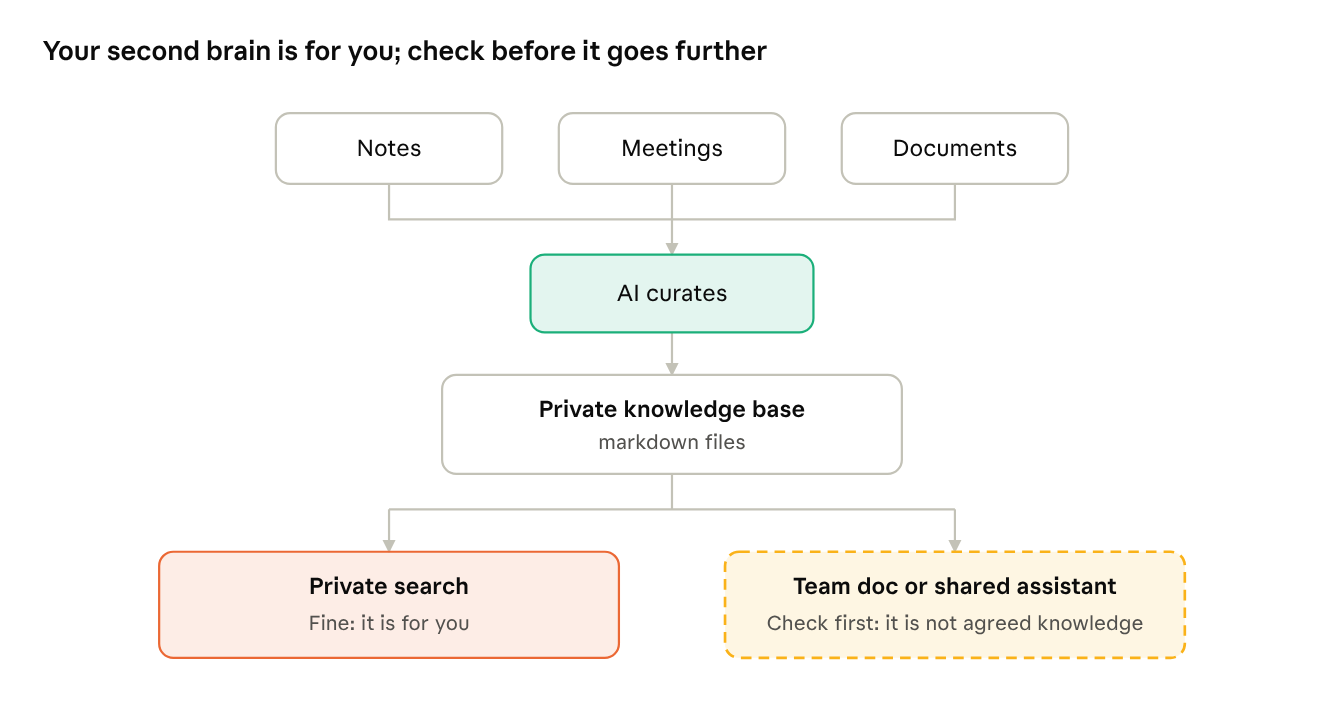
If you're ready for that, three things I'd keep in mind:
- Watch where you use it. For private search, feeding in your notes and meetings is fine. The risk is using it elsewhere: an answer based on your notes can end up in a team document or a shared assistant as if it were agreed knowledge.
- Check what you rely on. It's for your own use, so it doesn't need to be perfect. But check the AI's summary before you base a decision on it.
- Clean up regularly. More input means more outdated notes. The regular review matters even more here.
Open questions
- Your AI memory may hold the reasons behind decisions your team depends on. Which parts should colleagues be able to see, and who decides?
- Every AI tool reads your profile file first, so an outdated profile affects every answer without you noticing. What keeps it current when you skip the review?
For leaders: personal setups are where new practices start. Make it easy and normal for people to propose them to their team.
For developers: keep your profile file in version control, and share the parts that work with your team.
Further reading for developers:
- Dubois, Personal Context Management: a short description of the personal level and what belongs in it.
- APM: installs the same skills across agent tools, so a personal setup is easy to share with the team.
Next, part 3: Record Decisions and Their Reasons as You Go
Written by
Our Ideas
Explore More Blogs


Knowledge Up, Context Down
AI tools work better with the right context. This series covers four levels of knowledge, and when knowledge should move up, flow down or be removed.
Roel Bertens


Contact