


Blog
Fast With AI, Lost Without Context
Part 1 of Knowledge Up, Context Down. Fast results with AI, then losing track of decisions.


New to this series? Start with the overview. Next: part 2.
I recently built a proof of concept with AI tools. I had something running very fast. Code, documentation and even decisions were generated quickly, and the first results looked good.
Then it slowed down. I had to make decisions, and they became harder because I had given the AI a lot of freedom at the start. Because of the speed, I didn't fully understand the setup or the choices behind it. I kept coming back to the same questions. What assumptions were behind the AI's suggestions? Were they mine, or based on research the AI did?
That experience is the reason for this series. The question I want to answer: how do you manage knowledge so that working with AI stays fast, and you still know which choices were yours?
Speed without context doesn't last
Looking back, the problem was not the output. AI tools are good at producing output, but not at keeping track of why. If nobody records decisions and their reasons, two things can happen. You get stuck, because you can't tell which earlier choices are safe to change. Or you get lost, because the AI keeps building on assumptions nobody confirmed. In my proof of concept, I ran into both.
This is not specific to coding. NotCo, a food company, used an AI system to propose plant-based recipes. One early proposal contained dill, and the milk came out green. The system had a lot of data on ingredients, but not what any chef could have told it: dill turns food green, and nobody wants green milk. NotCo fixed this with a feedback loop: chefs made and judged the recipes, and their judgments went back into the system (Chatterji, Rock & Talamàs, 2026).
The point is the same as in my proof of concept: the model was capable, but the context was missing.
The pitfall: letting the AI decide
In my proof of concept, I didn't skip planning and deciding, but I did too little of it. That is the tricky part. The AI just builds with whatever you give it, and it won't tell you that more planning is needed. Because it can write a plan and make choices itself, it's tempting to leave more and more to it. But the AI doesn't know what you want unless you tell it. Where you leave a gap, it fills it with a plausible default, and it does that quietly and very convincingly.
AI is good at proposing options and pointing out trade-offs. Small choices that are easy to undo can be left to it. The choices that shape what you build, and the reasons behind them, should stay with you. Otherwise you get something that works, but not necessarily what you needed.
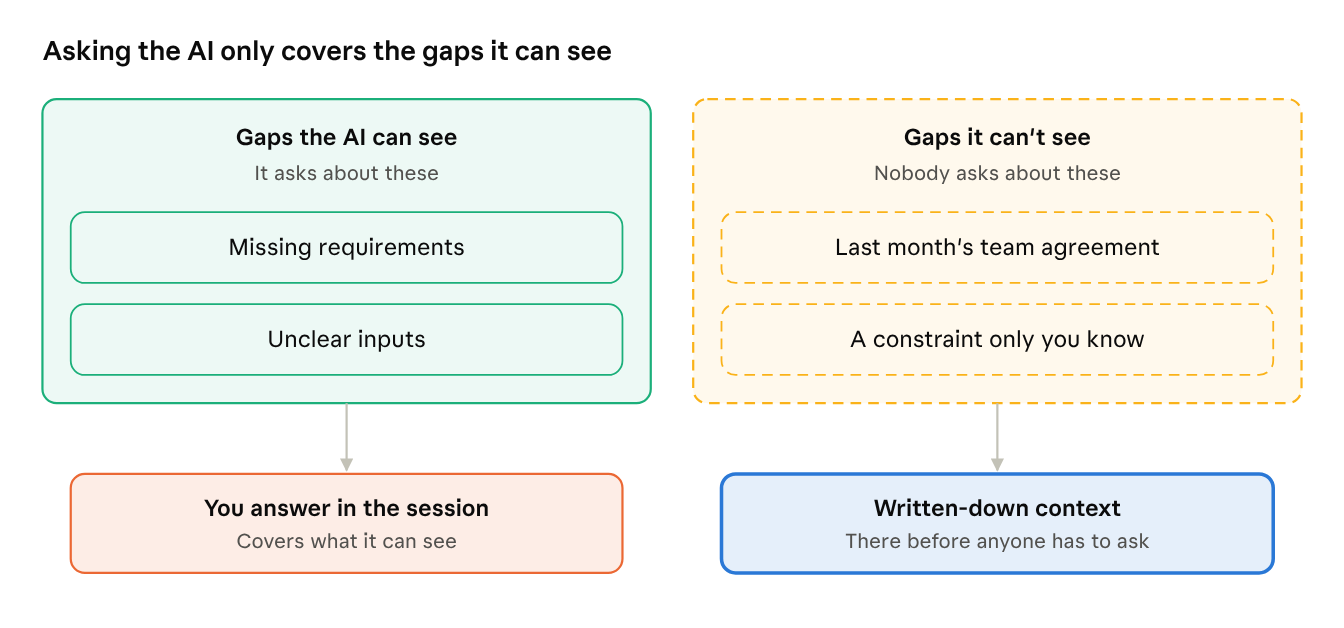
An obvious fix is to ask the AI to collect the context it needs first. That helps a bit: it will ask questions. But it only asks about gaps it can see. It doesn't know about the agreement your team made last month, or the constraint only you know about. The AI doesn't know what it doesn't know. That is why the rest of this series is about writing context down, so it's there before anyone has to ask.
This is not a new problem
Knowledge management research described this long before LLMs. In 1994, Ikujiro Nonaka described how knowledge moves from individuals to groups to the organization, by making personal know-how explicit and sharing it. Chatterji, Rock and Talamàs recently revisited his work for AI. Their conclusion: AI adds knowledge that is hard to explain but easy to copy, and it only becomes useful organizational knowledge once it is connected to the organization's own context.
What has changed is the speed. AI tools let you produce in a day what used to take weeks. That includes decisions nobody wrote down, or even had time to think about.
Memory features don't solve it by themselves
Most AI tools now offer some form of memory: assistants that remember your preferences, team agents that keep feedback, organizational context stores. These are useful, but they store whatever ends up in them. They don't decide what is correct, who owns it, or when it is outdated. And if everyone builds their own AI memory, you end up with many slightly different versions of how the organization works.
Four levels
As described in the series overview, I split knowledge into four levels: personal, project, team and organization, each with its own owner and tools.
The next parts cover each level. Part 6 – The flow covers what I think is missing in most writing on this topic: clear guidance on when knowledge should move from one level to another.
Three questions to start with
Before you add an AI memory tool to your workflow, check:
- Which level is it for? Personal memory and team memory need different owners.
- Who decides what gets stored? If it's the AI, how do you find and fix a wrong entry?
- Can you trace where a decision came from? If not, you will likely run into the same problem I had.
Open questions
- Which decisions should an AI read at the start of every session, and which only when asked?
- How should an AI tool mark the decisions it made on its own assumptions, so you can find them later?
- When does informal knowledge sharing stop working: at a certain team size, or as soon as agents join?
For leaders: AI makes your teams faster, which makes recorded context more important, not less. Ask how your teams keep track of the decisions AI helps them make.
For developers: next time you accept an AI-generated change, write down why, and whether you or the AI made the call.
Further reading for leaders:
- Nonaka (1994), A Dynamic Theory of Organizational Knowledge Creation: the classic paper on how personal knowledge becomes organizational knowledge.
- Gartner on AI foundations (April 2026): organizations with successful AI invest up to four times more in data foundations, and context, including metadata, is now called mission-critical for data and analytics.
Next, part 2: Your Own Context and When to Share It
Written by
Our Ideas
Explore More Blogs


Knowledge Up, Context Down
AI tools work better with the right context. This series covers four levels of knowledge, and when knowledge should move up, flow down or be removed.
Roel Bertens


Contact