


Blog
Personal RAG Without the Drag (It's Actually Agentic Search)
Most conversations about RAG start in a place that makes sense for companies and very little sense for personal notes. They typically begin with chunking strategies, embedding models, vector databases, rerankers, freshness guarantees, permission boundaries, eval tooling, dashboards, orchestration, and with someone always bringing up GraphRAG.
Those are real, genuine concerns when you're building retrieval over large, messy, multi-user corpuses.
My problems are honestly smaller than that. I have an Obsidian vault with raw captures, cleaned-up notes, controlled tags, and topic wikis, and I want Claude, Codex, or another assistant to use that context without me having to paste 5+ into the prompt every time.
In all fairness, my title was a bit of a click-bait, what I'm actually building has a more precise name than RAG. Anthropic calls the broader discipline context engineering, and the specific strategy here is what their engineering team calls just-in-time context loading, an agent keeps lightweight references, in this case file paths, and loads the real content at runtime instead of pre-processing everything up front. RAG is one way to implement that. Pointing an agent at a well-organized folder is another, and for my single Obsidian vault, it works amazingly.
 I'm building this out as an actual Obsidian plugin, Nous, inbox, notes, tags, wiki threshold, and all. Early and rough in places, but if you'd rather see it as code than a blog post, that's where it's happening.
The Vault Is the Architecture
The useful part of my vault is organized around four folders (Figure 1):
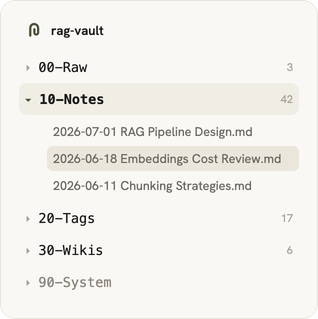
Figure 1. The vault's four working folders, in Obsidian.
There's also 90-System/templates/, which defines the shape of the notes, but the working knowledge really lives in those first four folders. 00-Raw is intake, 10-Notes is the normalized layer, 20-Tags is the controlled vocabulary, and 30-Wikis is synthesis.
If that's starting to sound like Databricks' medallion architecture, bronze, silver, gold, that's honestly not an accident. Raw, notes, and wikis map cleanly onto it, with tags off to the side as a reference layer. 'Obsi-dallion,' if you want a name for it. Figure 2 shows the resulting pipeline:
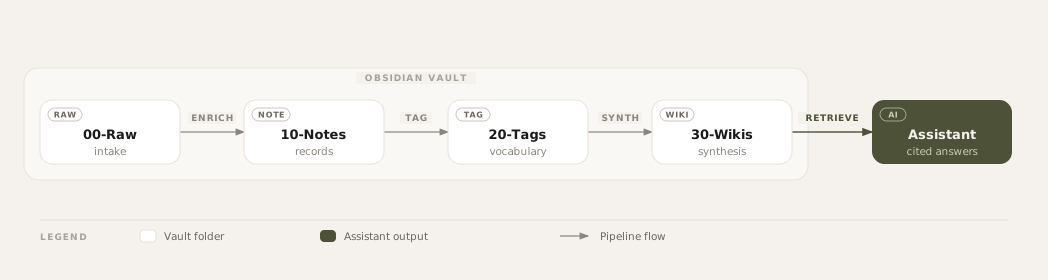
Figure 2. Raw captures to enriched notes, controlled tags, topic wikis, and assistant context.
00-Raw Is Not the Knowledge Base
The raw folder stays deliberately boring: voice notes, meeting transcripts, pasted thoughts, inbox fragments, whatever lands before anyone has looked at it twice. A transcript is not a note. It hasn't been cleaned, titled, tagged, linked, or summarized, so it doesn't carry the same retrieval weight as an enriched note or a wiki page. My assistant treats 00-Raw as something to check, not somewhere to start. Raw material can be messy - it just can't pass itself off as finished knowledge, and a skill is what turns it into one.
10-Notes Is Where Capture Becomes Data
That skill reads whatever landed in 00-Raw and rewrites it into a fixed shape - frontmatter first, then body sections. It's basically what vector database pipelines do to every chunk before it gets embedded - structured extraction is an old idea, LLMs just made it cheap enough to run on personal notes too. The frontmatter is the schema (type, date, source, project, tags, status); a meeting note looks like this (Figure 3):
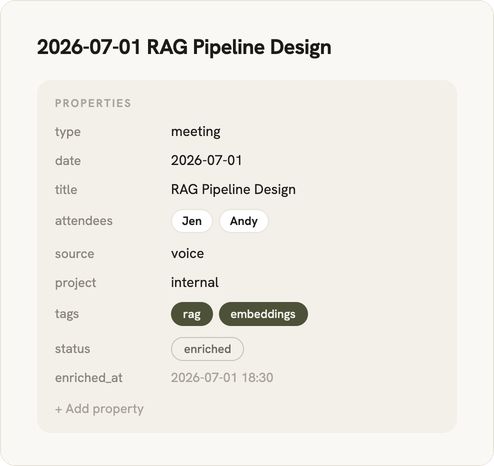
Figure 3. A meeting note's structured frontmatter.
The body is just as important as the metadata, shown in Figure 4:
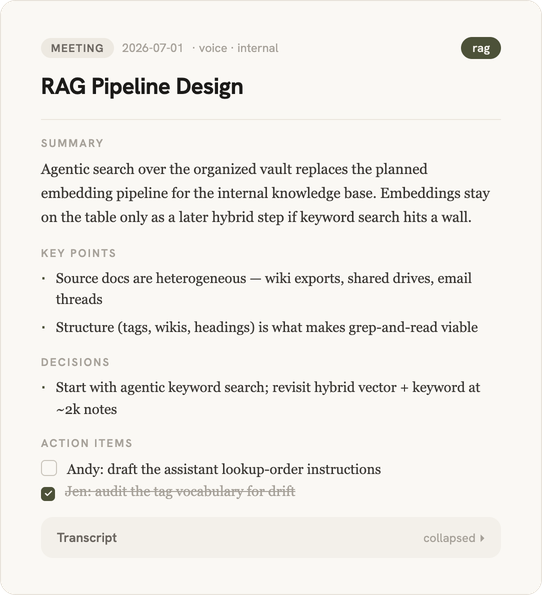
Figure 4. The same note's body: Summary, Key points, Decisions, Action items, and Transcript.
The frontmatter makes the note filterable without opening the file. Headings matter too: Summary and Transcript hold different kinds of information, so a search that ignores headings can just as easily hand back a wall of transcript when a two-sentence summary would do. And Related links the note to others by hand - which, if you squint, is a graph node, minus the graph database.
A point I want to highlight: I don't make my assistant infer structure the note can just state. Vector databases lean on metadata filters for the same reason - if I already know the date, project, decisions, and related notes, that belongs in the Markdown, not something to rediscover with embeddings.
20-Tags Is a Vocabulary, Not a Hashtag Dump
Each tag is its own Markdown file with a small definition (see Figure 5):
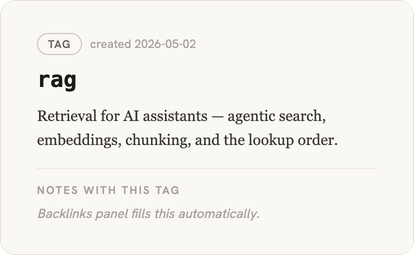
Figure 5. A tag file: a one-line definition plus auto-populated backlinks.
That one-line definition is what makes tags actually useful. A point I really want to emphasize is that a tag has to earn its spot. The same skill that writes the note also assigns tags, in the same pass, and I tell it to be extremely reluctant about adding new ones. It checks what's already there first, and only adds a tag if nothing covers the concept, the concept is actually central to the note, and it'll plausibly come up again later. On a close call, it just reuses whatever's closest.
Tags end up being the cheapest filter I've got. A training question starts from the training tag, a client question starts from the client tag. When a topic has both a tag and a wiki, the tag is the boundary and the wiki is the current synthesis.
30-Wikis Is the Synthesis Layer
By now the vault has gone through capture, cleanup, and tagging, and this next layer is where it stops being a pile of notes. A wiki page is basically a living briefing over a cluster of source notes, close to what Andy Matuschak calls an evergreen note, one that gets rewritten as understanding improves instead of staying frozen at capture time. It has a stable shape, shown in Figure 6.
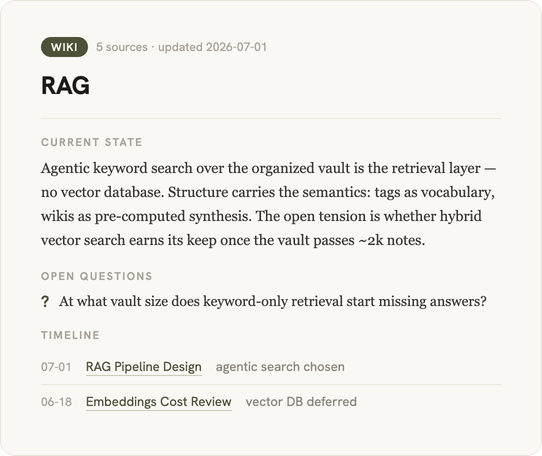
Figure 6. A synthesized wiki page for a topic.
Most personal RAG setups skip this layer and expect the model to synthesize everything at answer time, which wastes the work already done in the vault. A wiki page is already the compression of many notes into something a human can read.
In this next part, there's a second skill that builds the wikis, and it only kicks in once enough notes pile up around a topic. My rule of thumb is four: once a topic has four meeting notes and no wiki yet, it's ready for one. The same skill refreshes existing wikis the same way, as new notes land. Below four notes, I don't bother, a wiki at that point is just one conversation dressed up with headers.
For retrieval, wikis come before source notes, current state first, evidence second, and raw transcript only when I need to verify something. You can think of it as a reranker I computed once, by hand, instead of scoring it fresh on every query. Figure 7 shows the full order.
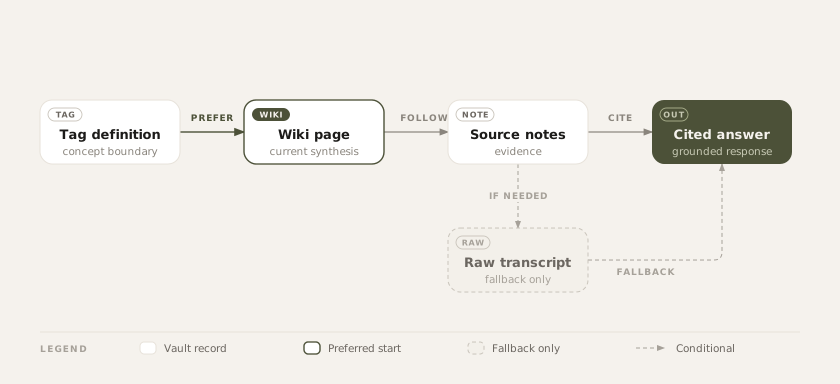
Figure 7. The assistant's lookup order: tag definitions first, raw transcripts only when needed.
That order is really the whole point. Retrieval can't clean up a bad note, fill in missing context, or check that anything is true, it just finds text and hands it to the model. A half-finished capture gets answered just as fluently as a well-sourced one, same tone, same confidence, no visible seams, so the order is what decides what surfaces first.
There's No Retrieval System Left to Build
Once the vault has these layers, there's no retrieval system left to build. Claude and Codex already read files, grep, and follow links - that's the job. All they need is to be told where to look and in what order:
Vault lives at <path>.
Check the tag definition first, then the topic wiki, then source notes.
Only open 00-Raw when the wiki and notes do not have the answer.
Cite file paths or Obsidian links.
That's the entire integration, the same list from paragraph one, minus everything on it. No hosted vector database, no local index, no sync platform, no dashboard, no separate memory product, no dedicated retrieval skill. My assistant's own file tools are the retrieval layer, running directly against the Markdown that's already the source of truth. Nothing gets built, so nothing falls out of sync.
This mechanism has a name too, agentic search, sometimes called agentic retrieval. It's an agent using its own tools, grep, glob, read, iteratively, instead of a fixed embedding-lookup pipeline. It's not a fringe choice either. Claude Code shipped with RAG and a local vector database early on, then dropped it once agentic search proved to work better. Boris Cherny, who leads Claude Code, has said it "outperformed everything. By a lot." He's separately said agentic search avoids RAG's issues around security, privacy, staleness, and reliability, the exact concerns that make RAG heavy to run. Amazon Science found agentic keyword search reaching 94.5 percent of RAG's faithfulness with no vector store at all. The vault structure in this post exists to make that kind of search cheap. Tags, wikis, and headings are what let grep-and-read replace an index in the first place.
This is how I actually work day to day. I've got standing instructions that point Claude at the vault path, the same pattern shown in the block above, and it checks there whenever a task could use the context. The vault holds the knowledge, and just pointing my assistant at it is the only retrieval layer I actually need.
Keyword Search Comes First
Keyword search sounds outdated, but honestly it fits how this vault is built. Embeddings are for when you don't know the exact words to search for, they turn text into numbers and pull back results that mean roughly the same thing even when the wording doesn't match, and that's genuinely useful, just not for most personal questions. Most of the time I already know the note title, the project, the client, the tag, the date, or the heading I'm after, things like Decisions, Action items, Open questions. If the words are already in my head, plain keyword search finds them faster and more reliably than a similarity search ever would. That's also where a lot of practitioner writing lands too: you probably do not need a vector database for your RAG, yet.
So the first instruction I give my assistant isn't "find semantically similar chunks," it's more like a filtered lookup:
Find notes tagged training.
Prefer 30-Wikis.
Then search 10-Notes.
Return the Current state, Open questions, Decisions, and Sources sections.
Cite file paths or Obsidian links.
Which is honestly a much smaller problem to solve. If keyword search ever falls short, embeddings can just slot in later as one extra step, not a whole new system: run both searches, combine the results, rank them, and hand the best ones to the model.
keyword results
  + embedding results
  -> merge
  -> rerank
  -> cite notes
Embeddings are honestly just an upgrade on a search that already works, not a substitute for having the structure in the first place. A fuzzy search still needs something well-organized underneath it.
Vector databases really exist to answer one question well: what means something like this, across more content than anyone could hold in their head. That's a hard job, and a genuinely real one, it's just not mine. I already have the handle, a tag, a title, a date, so reaching for similarity search on top of that isn't a scale problem, it's a purpose mismatch.
There's a related instinct worth resisting too: just retrieve more, dump the whole vault in, let the model sort it out. More context helps, until it doesn't, honestly. Chroma's research on context rot found that even strong models get 30 to 50 percent less accurate well before the context window is actually full, because burying the right answer in a pile of loosely related notes just isn't the same as handing it over directly. That's the real reason the lookup order matters, not just to save tokens, it keeps the wiki's answer from getting lost under three raw transcripts nobody needed to read.
What This Gives My Assistant
This setup honestly gives my assistant more than text, it gives it a trust model. 00-Raw means probably-unclean source material, 10-Notes means an enriched record with summary, metadata, and links, 20-Tags means a controlled concept boundary, 30-Wikis means current synthesis over a topic.
So it answers differently depending on what it finds: start at the wiki if one exists, flag a status: draft note as such, say plainly when an answer only has individual notes behind it, treat 00-Raw material as unprocessed, and show disagreement between notes instead of smoothing it over. Really the same instinct behind eval tooling on a real RAG system, just done by hand instead of by a labeling pipeline, knowing how much to trust an answer before you hand it over.
That's the real payoff, genuinely. My assistant isn't retrieving more context, it's retrieving context with shape.
Where This Breaks
This system has real sharp edges:
- Enrichment backlog. Capture is easy, so raw material piles up faster than I actually process it. Fine in 00-Raw, it's supposed to be messy, but a problem the moment an unprocessed capture gets treated like a finished note.
- Enrichment errors. Honestly, the skill can still misread a transcript, get a decision wrong, or pick the wrong tag, and once that's written into a note it carries the same weight as anything correct.
- Tag drift. A controlled vocabulary only stays controlled if new tags stay rare and old ones don't quietly change meaning.
- Stale wikis. Synthesis can fall behind the notes it's meant to summarize. The updated date and Sources section are how I catch it after the fact, basically a freshness guarantee I run by hand instead of a dashboard.
- Duplicate capture. A duplicates/ folder beats pretending they don't exist, but retrieval still needs to know two near-identical transcripts aren't independent evidence.
- Graph hygiene. A note in 10-Notes or 30-Wikis with no links out is a red flag. Raw captures can sit alone, enriched notes really shouldn't.
Obsidian's Graph view seems like the obvious place to check that last one, but honestly I've found it's mostly decoration (Figure 8):
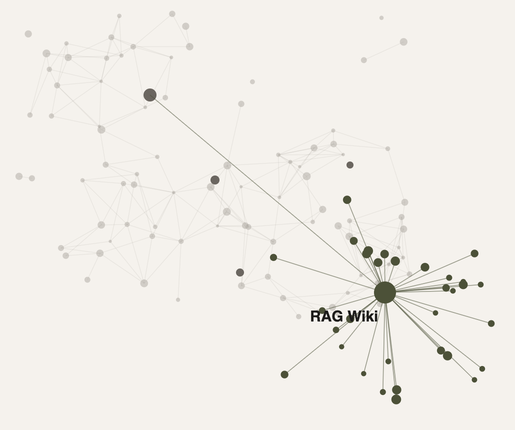
Figure 8. Obsidian's Graph view. Looks nice, doesn't do much.
Looks good in a screenshot, which is roughly all it's good for, honestly. I don't navigate by it, and it plays no role in how my assistant answers anything. The graph that actually works is the one enforced by Related links and the lookup order, not the one rendered on screen. Which is also my answer to GraphRAG from the intro: at this scale, the useful part of a knowledge graph is really just link discipline, not a database to stand up and query.
The Point
Retrieval is only as good as what's underneath it. Capture into 00-Raw, promote into 10-Notes, keep 20-Tags controlled, synthesize into 30-Wikis, and only then let assistants search. Let embeddings show up later, if keyword search, tags, and links actually hit a wall.
The goal was never a miniature enterprise search platform for one person, just more useful notes. Ask a question, get back the right tag definition, the wiki page, two source notes, and an answer grounded in those files, that's honestly enough. The source of truth stays in Markdown, the folders say what kind of knowledge each file holds, and my assistant gets better context for free.
Small, local, inspectable, boring is what I ended up with. Turns out that's agentic search, not RAG, and it's exactly what I wanted.
Written by


Contact