


Blog
Sovereign RAG AI on on-prem hardware: what we learned

In June, we were blessed to receive our own NVIDIA DGX Spark. It didn't take long before we started deploying our sovereign AI architecture on it. In this blog post, we want to tell you what we learned from deploying our own RAG chatbot.
Our first goal is to fully run a RAG chatbot on-prem, on a computer that fits on a desk. The documents, the vector store, the embedding model and the LLM all live on our NVIDIA DGX Spark which is comfortably sitting in our Amsterdam office. No data leaves the machine. So, how easy is it to deploy your own RAG on on-prem NVIDIA hardware? Surprisingly, the RAG code is the easy part. Our whole pipeline is under 2,000 lines of Python. We soon discovered that the hard part is the hardware: the arm64 CPU and the memory bandwidth of the Spark.
Why on-prem RAG?
Many companies want generative AI on their own documents, but cannot responsibly send the documents to a public API (think of legal firms, hospitals, the military). In this context, fully on-prem AI solutions are preferred as the data and the model never leave the company.
For instance, our Spark is securely locked in a cabinet in the Amsterdam office.
What we built
As a starting point, we used the NVIDIA RAG Blueprint, a full reference RAG system. As our focus is mostly on performance, we simplified the blueprint design into the following:
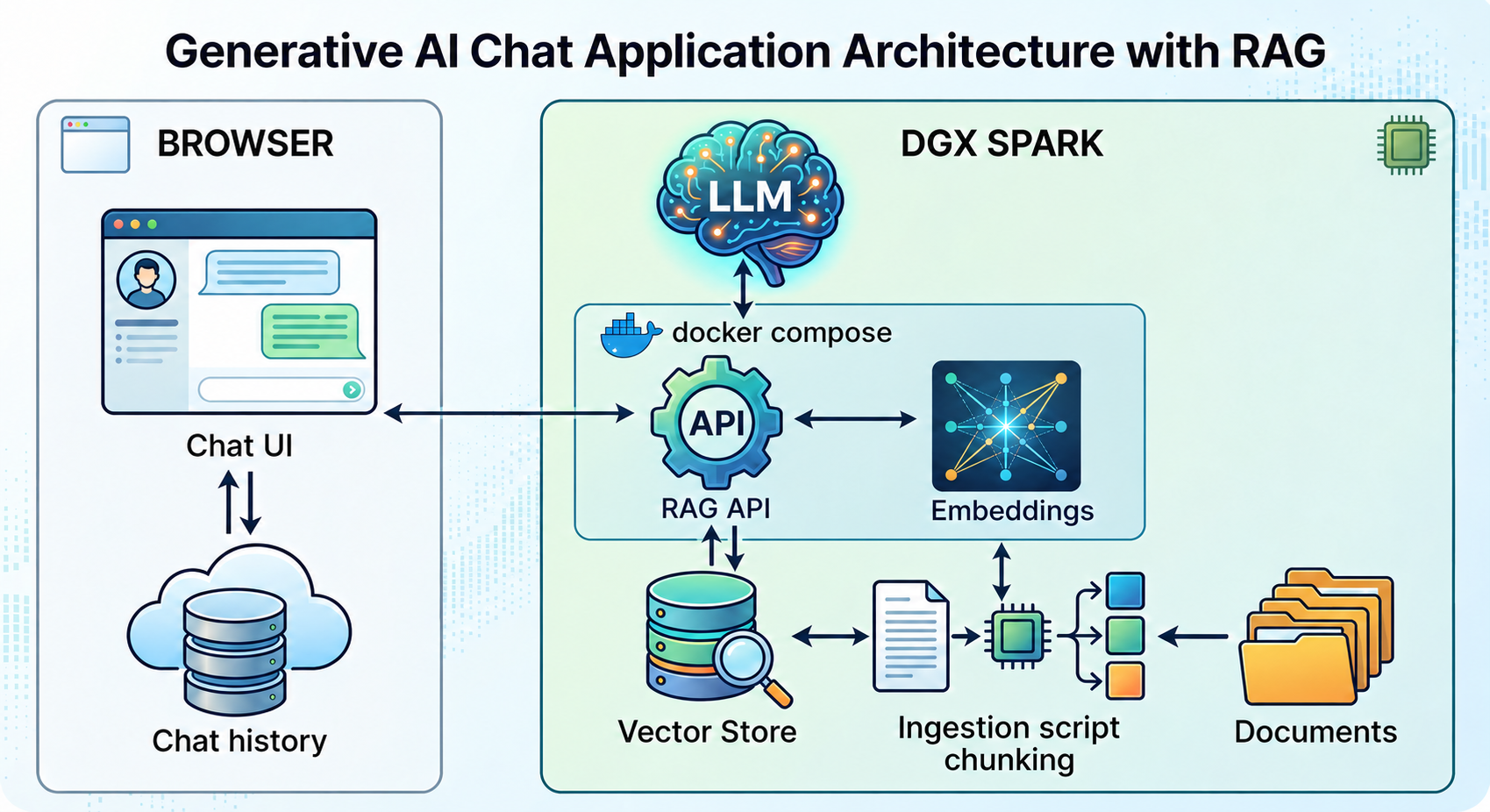
The RAG demo on the DGX Spark. Everything runs on one machine.
The graph above can be split in two flows, a data ingestion and a user query flow. The data ingestion flow starts with documents which, for security reasons, live on the machine. These documents are chunked, embedded in vectors and stored in the vector database. The user query flow starts when a user asks a question in the chat UI. The RAG API embeds the question, retrieves the most relevant chunks of documents, and sends the chunks and the question to the LLM. Finally, it returns the answer to the user.
The technology stack is:
- The LLM is NVIDIA Nemotron 3.5 Lightning 30B-A3B served via vLLM.
- The embedding model is
e5-small-v2(also served via vLLM). - The vector store is Milvus.
- The RAG API is a FastAPI service.
- The machine is reachable via Tailscale.
Hard part 1: the CPU is arm64
Spec-wise, the DGX Spark runs on the GB10 Grace Blackwell chip: a Blackwell GPU next to an arm64 CPU. Most AI container images and NVIDIA blueprints target x86 servers (often arm64 support is listed on the roadmap). Needless to say, x86 containers do not start on our Spark. Arm64 support on NVIDIA model containers (NIMs) was incomplete too (for example, the full NVIDIA RAG Blueprint needed 11 bug fixes to run on a DGX Spark).
To circumvent this, we kept the blueprint's OpenAI-compatible API, and wrote our own ingestion and retrieval pipeline. Because any server with an OpenAI-compatible API can replace vLLM, we will be able to easily switch to NIMs in the future.
Hard part 2: memory bandwidth, not memory size
The Spark has 128 GB of unified memory, shared by the CPU and the GPU. 128 GB sounds like room for a very large model. But the LLM, the embedding model and the database all share the 128 GB, and memory size is not the real limit. To generate one token, the GPU reads all active weights of the model from memory. The memory bandwidth of the Spark is 273 GB/s. A dense 70B model fits in memory, but generates only a few tokens per second, which becomes unbearably slow for a user-facing application.
So we picked the model to fit the memory bandwidth. A mixture-of-experts (MoE) model activates only a small part of the model's parameters for each token. Our choice was Nemotron 3.5 Lightning 30B-A3B, which has 30 billion parameters, of which about 3 billion are active per token. With 4-bit weights, the GPU reads about 1.5 GB of weights for each token. 273 GB/s divided by 1.5 GB gives a bandwidth ceiling of about 180 tokens per second.
Implementation tricks and tips
- To keep the Spark stable, limit how much GPU memory vLLM can use. We keep the limit at or below 85% of the unified memory. Above 85%, the operating system and the other services run out of unified memory.
- Reasoning takes most of the time (about 90% of the tokens), but enabling thinking aids in outputting answers which are grounded in the chunks.
- We recommend running
nvidia-smibefore every benchmark to check for other running jobs. - Speculative decoding was the strategy which increased performance the most.
- The second biggest increase goes to swapping Ollama for vLLM to serve the model.
Making the LLM fast: speculative decoding
To test the performance of the solution, we benchmarked the LLM on the Spark with GuideLLM. The benchmark consists of N questions, each with M retrieved chunks.
The baseline (model served with vLLM) reached 79 tokens per second for one user, 44% of the bandwidth ceiling. The biggest win came from turning on speculative decoding with multi-token prediction (MTP).
In a nutshell, speculative decoding means using a smaller, faster draft model to propose tokens and the main LLM to check them (An Introduction to Speculative Decoding for Reducing Latency in AI Inference). MTP is a variation that lets the LLM (with a few extra built-in layers) draft the next tokens, so we do not need a second, smaller model. In our case, a draft step proposes the next 3 tokens. The full model then checks all 3 tokens in one read of the weights. About 80% of the drafts were correct.
MTP produces 3.4 tokens per read of the weights. The MTP answers kept the facts of the baseline answers. More drafts did not help: 4 drafts gave the same speed as 3 drafts.
So, how easy is on-prem RAG on a DGX Spark?
The RAG part was easy. The hardware took the effort. For your own RAG on a DGX Spark, four steps save the most time:
- Check for arm64 images first and plan to replace x86-only containers with vLLM or your own code.
- Choose the model for the memory bandwidth. An MoE model with about 3 billion active parameters in 4-bit gives good results for a chatbot.
- Turn on speculative decoding. This action gave us 69% more tokens per second.
- Leave memory for the operating system and the other services. Keep GPU memory utilisation at 85% or lower.
Banner image generated with Gemini.
Written by

Our Ideas
Explore More Blogs


Contact