Blog
AI-Driven Data Governance with Dataplex Aspect Types, Gemini, and BigQuery Data Policies

Data governance on Google Cloud often fails not because of missing controls, but because classification, review, and enforcement live in different places. Engineers label columns in one system, data stewards review metadata in another, and access controls are enforced in a separate system. The result is brittle pipelines and manual handoffs.
Google Cloud already provides the building blocks to close this gap. The challenge is using them with clear roles and boundaries.
This post outlines a practical governance workflow built on three services: - Dataplex Universal Catalog - Gemini - BigQuery Policy Tags with Data Policies
A demo implementation of this workflow is available in this repo.
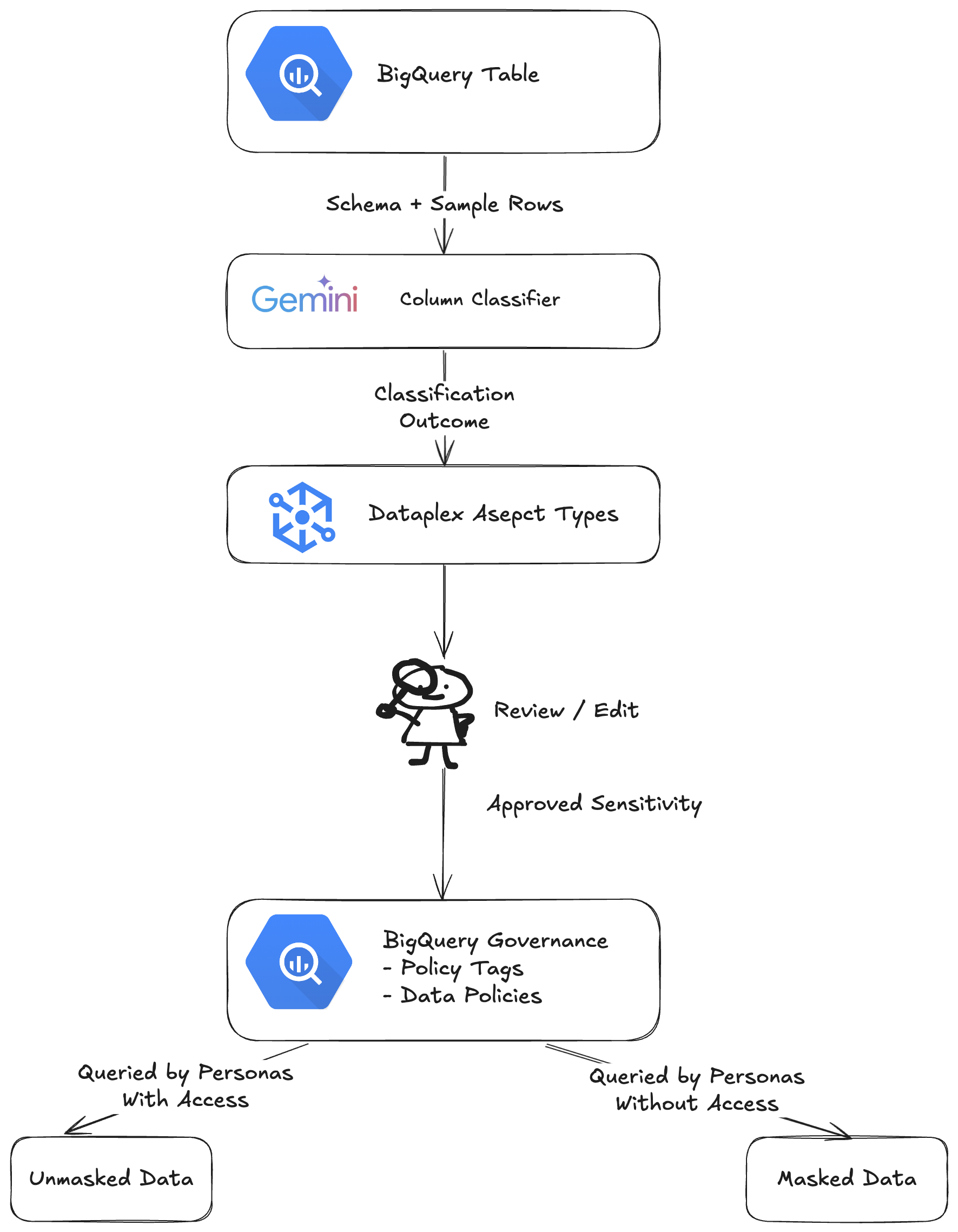 Figure 1: Architecture overview of a practical governance workflow in Google Cloud.
1. Register First: Why Dataplex Assets Matter
Before metadata can be attached or enforced, BigQuery datasets must be registered with Dataplex. Creating a Dataplex asset and enabling discovery ensures that BigQuery tables appear as first-class entries in the catalog.
When you register a BigQuery dataset as a Dataplex asset, you create a catalog entry to make it discoverable. Metadata such as tags, aspects, and glossary terms can be attached to the catalog entry, along with lineage and an entry list (e.g. which tables are part of the dataset).
This step is often skipped in examples, but it is essential: Aspect Types attach to catalog entries, not directly to BigQuery tables. Without discovery, there is nothing to annotate or read back later.
2. Describe, Don’t Enforce: Dataplex Aspect Types
Dataplex Aspect Types are designed for descriptive, reviewable metadata. In this workflow, a custom Aspect Type captures column-level attributes such as:
- category (PII, Transactional, Demographic, etc.)
- sensitivity (public, internal, restricted)
- reason (human-readable reason on why an attribute is attached to a column)
Gemini is used to propose these values by inspecting the schema and sample rows. The output is written to column-scoped aspects on the catalogue entry. See here for the prompt used in the demo.
Note that this step does not enforce access control. Aspect Types serve as a governance contract, capturing intent and context, and can be reviewed and edited by data stewards within the Dataplex UI.
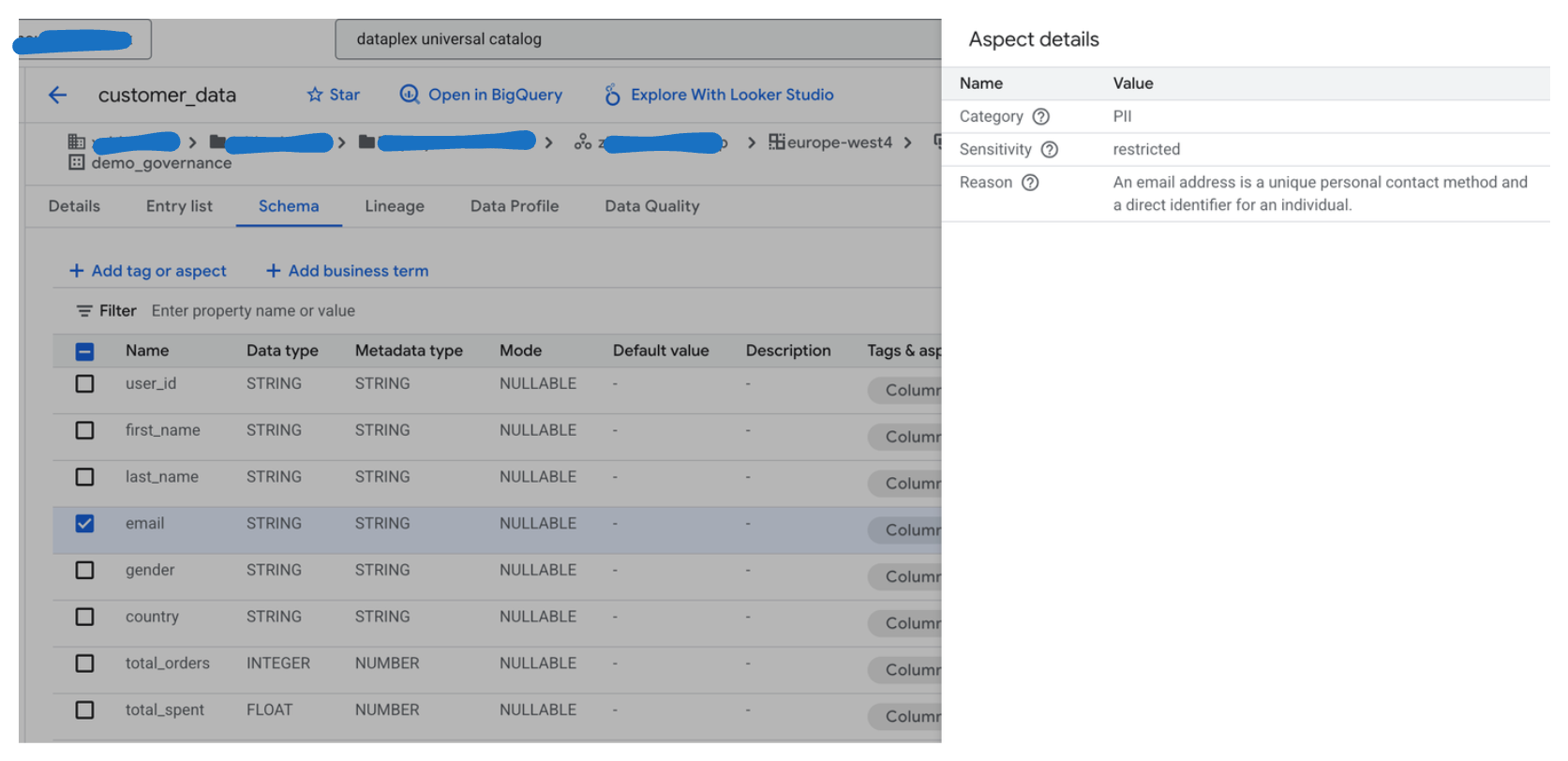 Figure 2: Dataplex Catalog view showing column-level Aspect values, which can be reviewed and edited by non-technical personas (e.g, data stewards) in the UI.
This separation matters. AI suggestions are useful, but governance requires a human checkpoint.
3. Enforce Separately: Policy Tags and Data Policies
Actual access control in BigQuery is implemented using Policy Tags and Data Policies.
Policy Tags reside in a Data Catalog taxonomy and are designed for column-level security. Note that tags are labels only and do not enforce access control. They become operational only when bound to BigQuery Data Policies, which define masking behaviour such as:
- default masking for restricted data
- type-appropriate masking for internal data
When a policy tag is attached to a column, BigQuery applies the masking automatically based on the querying user’s permissions.
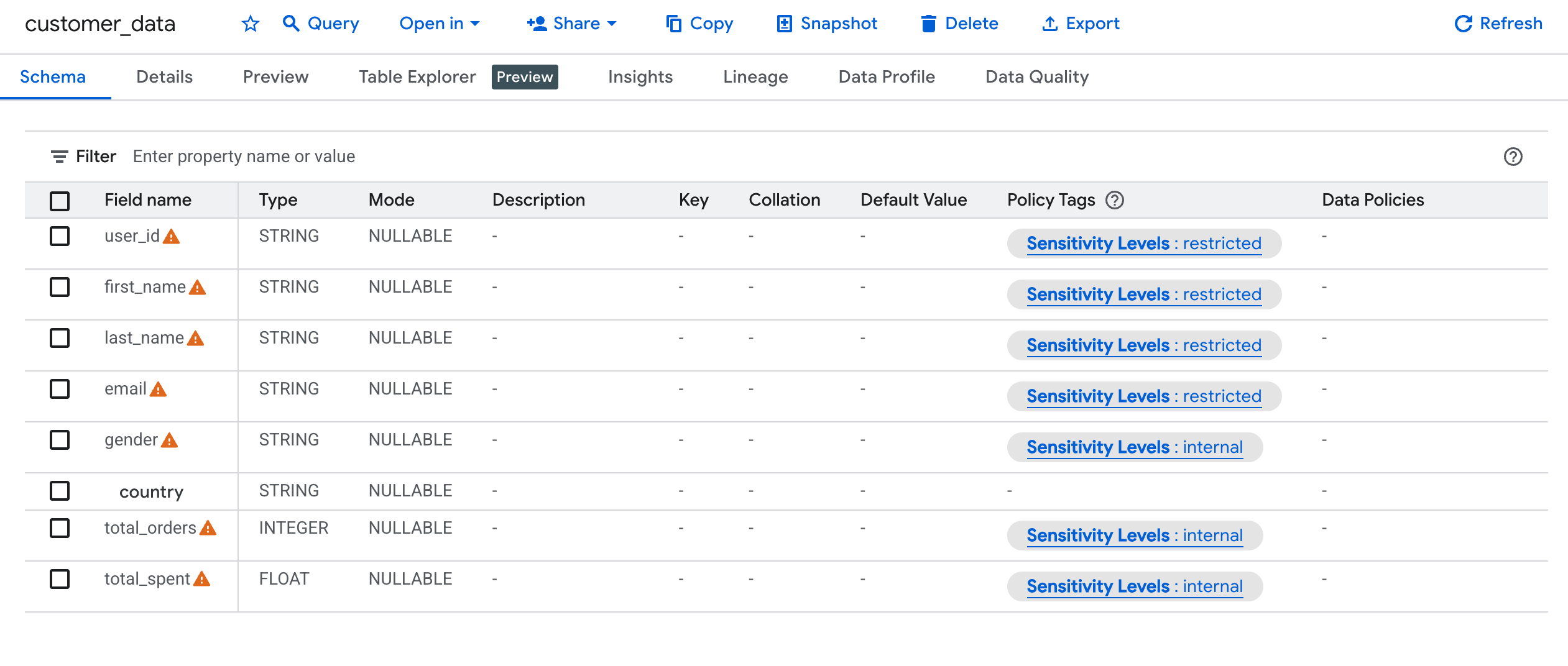 Figure 3: BigQuery schema view showing policy tag
Personas with access to the data (e.g., admin or data steward) will see the data as intended, while personas without access (e.g., business users) will see the data masked. 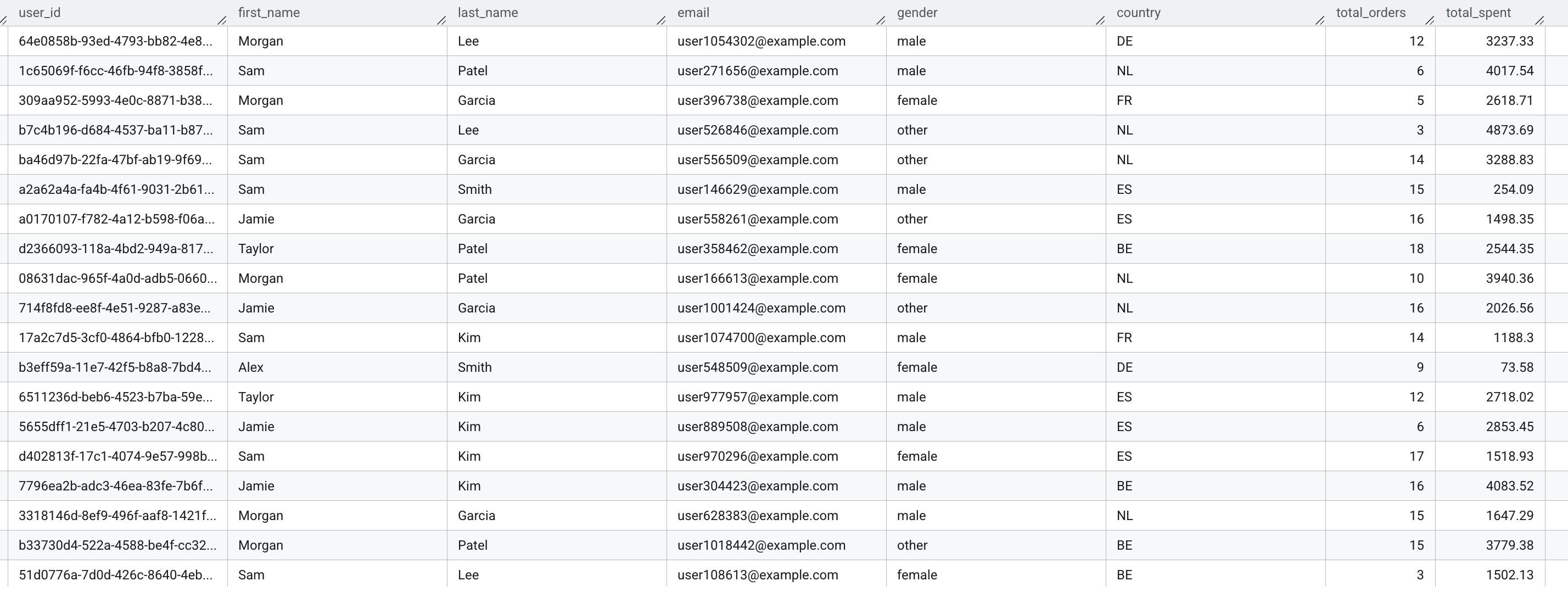 Figure 4: View of the unmasked data as seen by a persona with access to the data.
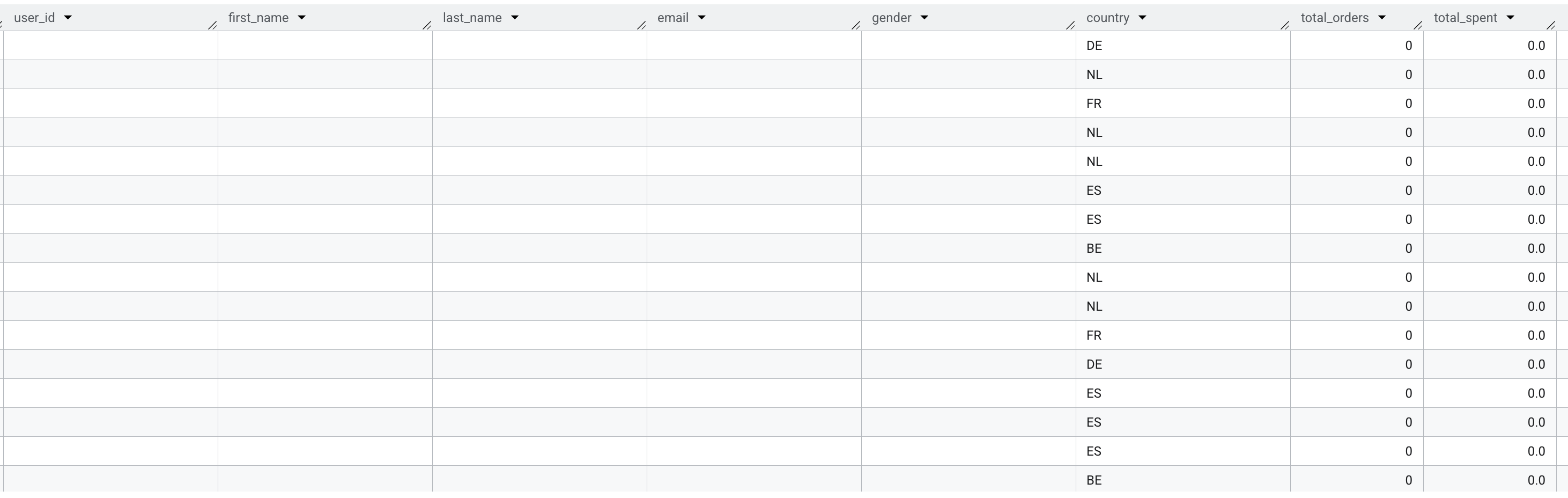 Figure 5: View of the masked data as seen by a persona without access to the data. Only the
 public column is visible. The other internal and restricted columns are masked with the default masking rule (NULL for string, 0 for numeric).
4. Bridging Description and Enforcement
There is no built-in synchronization between Aspect Types and Policy Tags—and that is by design. They serve different purposes.
The bridge is a small automation step:
- Read column-level Aspect values from the Dataplex catalog entry
- Map the sensitivity field to a policy tag with the same semantic meaning
- Update the BigQuery table schema to apply those tags
The process is illustrated in the following diagram:
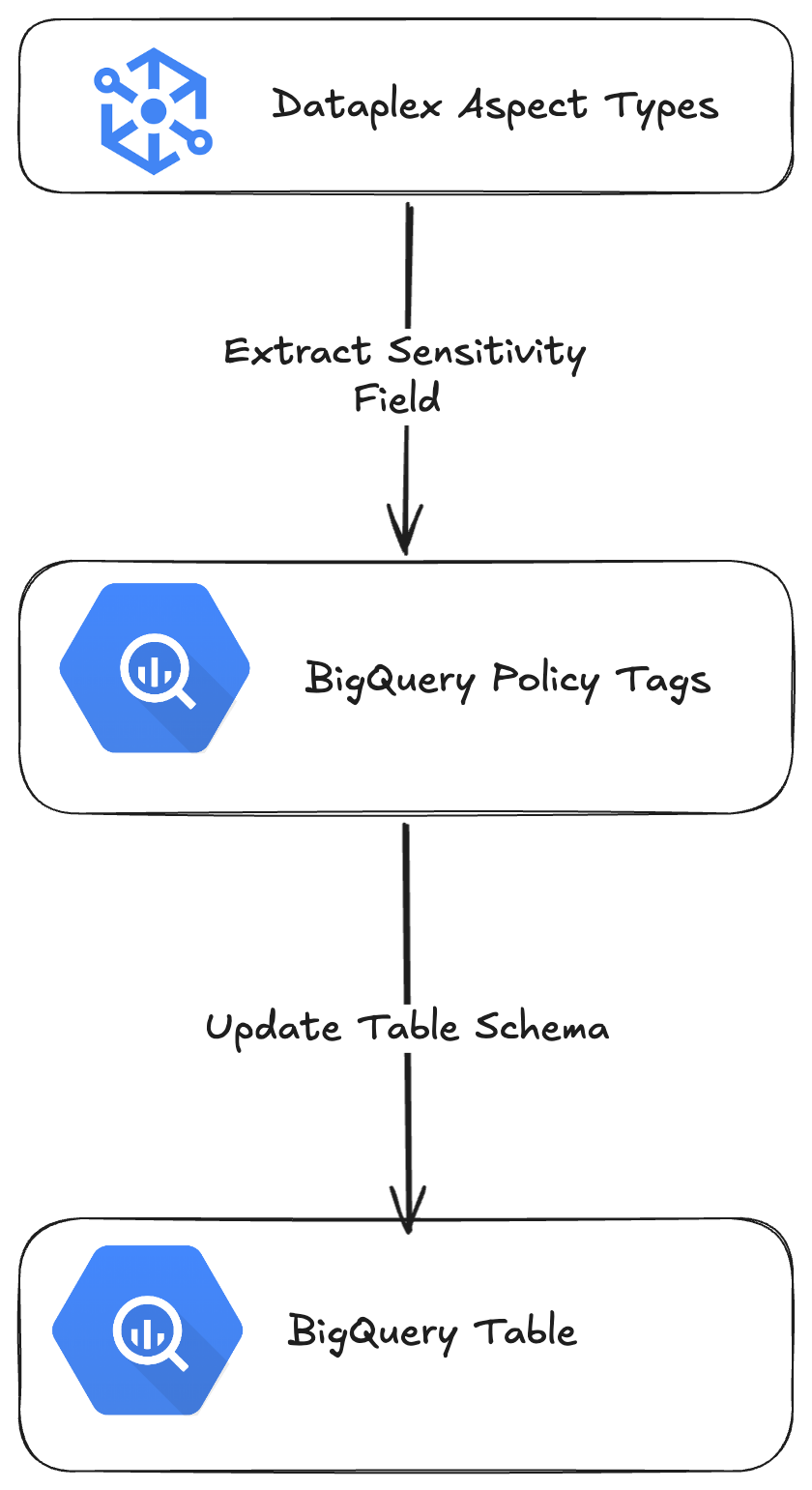 Figure 6: The process of bridging Dataplex Aspects to Policy Tags.
This keeps responsibilities clean: - Gemini suggests - Dataplex Aspects document and expose intent - Policy Tags + Data Policies enforce access
5. Why This Matters
Google Cloud also offers Sensitive Data Protection (SDP) for automated discovery and classification, and it fits well into this model. SDP can populate standardized aspects at scale. Custom Aspect Types remain valuable when classification logic is domain-specific or requires explanation.
The key insight is architectural: separate description from enforcement, and connect them explicitly. Dataplex provides the catalog and review surface, Gemini accelerates classification, and BigQuery enforces policy where it actually matters—at query time.
Used together, these tools form a governance workflow that is auditable, reviewable, and enforceable without collapsing everything into a single opaque step.
Photo by Pawel Czerwinski on Unsplash
Written by

Zhou Su
Zhou is an experienced Analytics Engineer and a passionate advocate for data democratization and modern data stack. Her mission is to provide high-quality data in a timely, automatic, secure and scalable way.
Our Ideas
Explore More Blogs


Contact