
AI coding assistants are transforming how we write and maintain software. In the analytics engineering space, dbt projects are particularly well-suited to AI development; they are convention-heavy, SQL-centric, and rich with repetitive tasks like writing tests, documenting columns and enforcing naming standards. But simply dropping an AI agent into your dbt project will not yield great results. To get real value, you need to structure your repository so that AI agents can work effectively within it.
This post walks through how to structure a dbt project for AI-powered development, drawing from the pgoslatara/dbt-ai GitHub repository built for my presentation at the NL dbt Meetup: 15th Edition. The ideas and processes described here can be replicated using many tools — the demo uses GitHub, GCP and Claude Code because they are free, have generous free tiers and/or are widely used. You can replicate similar setups with many other tools such as Azure DevOps, Gemini, Cortex, Snowflake, etc.
A north star for AI in dbt
Before diving into the how, it is worth establishing the why. The goal is straightforward:
"We should aim for a world where AI handles the repetitive, rule-based work so humans can focus on business logic and architecture."
In a dbt project, repetitive and rule-based work includes naming conventions, test coverage, documentation, SQL formatting, PR review checklists and much more. Business logic — how to model a fact table, when to use an incremental materialisation, what business questions the marts should answer — benefits hugely from human judgement. AI is increasingly powerful and there are a growing number of integrations available, but best practices are not very mature yet. The structure described below is designed to maximise an AI agent's effectiveness on rule-based tasks.
Getting started
Here is the high-level directory layout of a dbt project structured for AI-powered development, with the AI-specific components highlighted:
.
├── .claude/
│   ├── commands/            # Slash commands for interactive development
│   ├── settings.local.json  # Hooks and permission configuration
│   └── skills/              # Multi-step analytical protocols
├── .github/workflows/       # CI/CD and agentic workflows
├── .mcp.json                # MCP server configuration
├── models/
│   ├── staging/
│   ├── intermediate/
│   └── marts/
├── CLAUDE.md                # AI project instructions
├── dbt-bouncer.yml          # Convention enforcement rules
├── dbt_project.yml
└── pyproject.toml
The standard dbt structure (models/, dbt_project.yml, profiles.yml) remains unchanged. The AI components sit alongside it, adding capabilities without altering how dbt itself operates. Let's look at each component.
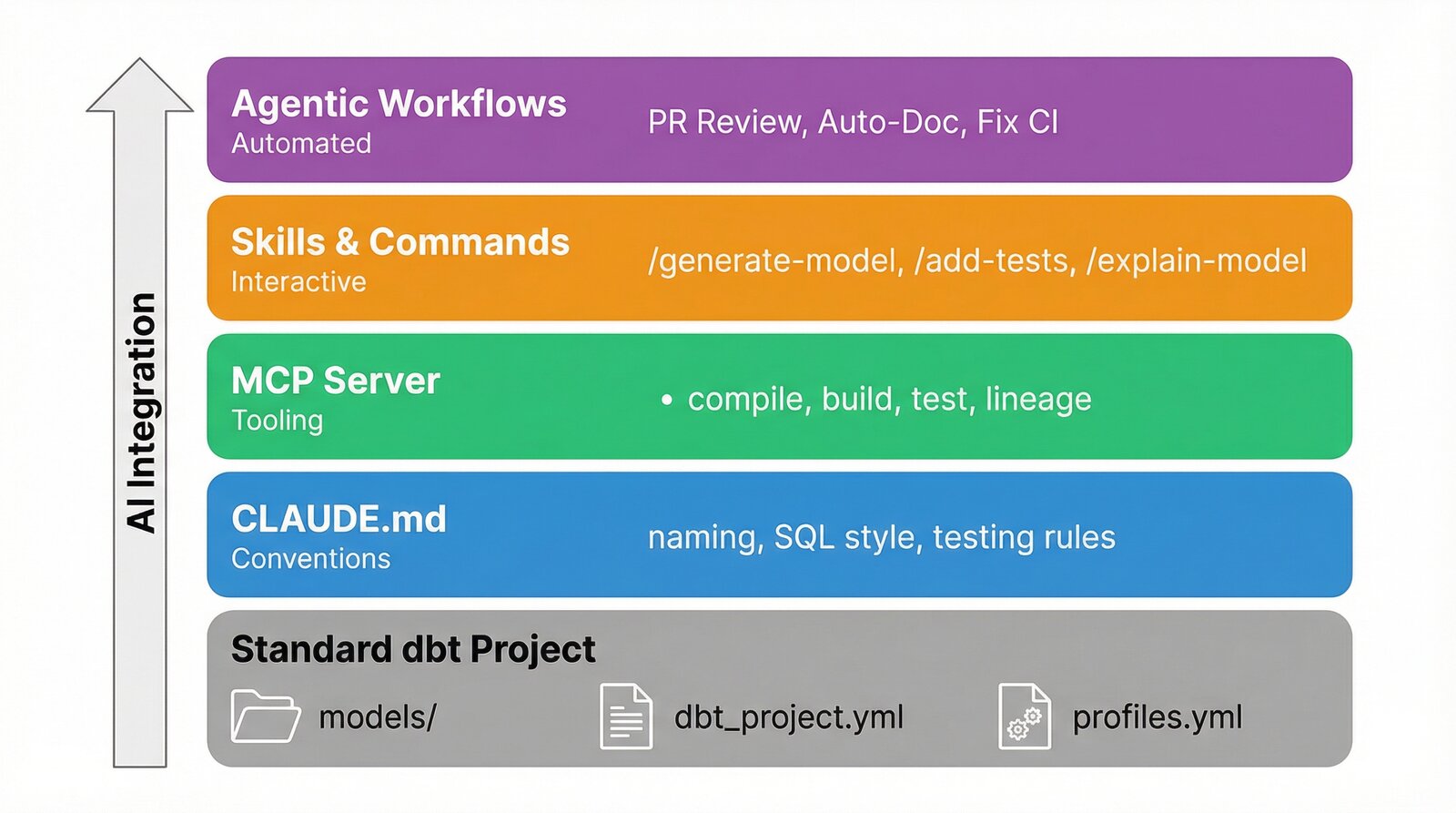
You do not need to implement everything at once. Here is a practical path to adopting AI-powered development in your dbt project:
- Start with
CLAUDE.md: Document your conventions. This is the highest-leverage action as it benefits both AI and human developers. Your existingREADME.mdor Confluence documentation is a great starting point. - Add the dbt MCP server: The dbt MCP server gives AI agents the ability to compile, build and test your project directly. Installation is a single configuration file.
- Pick one agentic workflow: The AI PR Review workflow is a good first choice — it provides immediate value on every pull request and requires minimal setup beyond a Claude Code OAuth token.
- Add skills and commands incrementally: As you notice repetitive patterns in your development workflow, encode them as skills or slash commands.
- Enforce with hooks: Once your conventions are documented, add hooks to enforce them automatically during AI-assisted development.
The below sections walk you through these options.
1. CLAUDE.md: Teaching AI your conventions
The foundation of AI-powered dbt development is a CLAUDE.md file at the root of your repository. This file contains project-specific instructions that Claude reads before performing any work. Think of it as onboarding documentation for your AI pair programmer, similar in spirit to the conventions you might enforce with tools like dbt-bouncer, but written in natural language for Claude.
A good CLAUDE.md for a dbt project covers:
-
Naming conventions
Define the naming patterns for each layer of your project, following dbt's recommendations. Be explicit about prefixes, separators and entity names.
-
SQL style
Document your SQL formatting preferences: keyword casing, CTE patterns, join alias conventions and column-per-line rules.
-
Materialisation rules
Specify which materialisation each layer should use and when to choose incremental models.
-
Testing and documentation requirements
State your minimum test coverage expectations, which test packages you use (e.g. dbt_expectations) and the documentation standards for models and columns.
-
Development commands
List the commands a developer (human or Claude) should use to lint, format and build the project.
Here is an excerpt from the demo project's CLAUDE.md:
## Naming Conventions
- Staging models: `stg_<source>__<entity>.sql`
- Intermediate models: `int_<entity>.sql`
- Dimension tables: `dim_<entity>.sql`
- Fact tables: `fct_<entity>.sql`
- Source YAML: `_<source>__sources.yml`
- Model YAML: `_<layer>__models.yml` or `_<source>__models.yml`
## SQL Style
- Lowercase for column and table names using `snake_case`
- One column per line in `select` statements
- Always alias tables in joins
- Use CTEs over nested subqueries
- CTE pattern: `source` → `renamed` → `select` for staging models
The key insight is that these instructions do not just help Claude write better code, they encode the same conventions your human developers follow, creating a single source of truth for how the project should be maintained. And the best part, Claude loads them every time it is invoked, resulting in every developer having access to all these benefits all of the time!
2. The dbt MCP server: Giving Claude access to dbt
A CLAUDE.md file tells Claude what to do, but it still needs the ability to interact with dbt directly. Model Context Protocol (MCP) enables this by allowing AI agents to use external tools. The dbt MCP server from dbt Labs gives the agent access to dbt CLI commands, model metadata, lineage and the semantic layer.
Configuration is a single JSON file (.mcp.json) at the root of your repository:
{
  "mcpServers": {
    "dbt": {
      "command": "uvx",
      "args": ["dbt-mcp"],
      "env": {
        "DBT_PATH": ".venv/bin/dbt",
        "DBT_PROJECT_DIR": "."
      }
    }
  }
}
No need to run a long-running, always-on process in the background. Just a single JSON file.
With this configured, Claude can compile models, run tests and inspect the project manifest without shelling out to dbt manually. This is particularly powerful when combined with slash commands, allowing Claude to compile the project, read the manifest.json and validate changes against the real schema, vastly reducing hallucinated table or column references while at the same time reducing token usage and overall runtime.
3. Skills and slash commands: Interactive development
Beyond the foundational CLAUDE.md and MCP server, you can give Claude reusable capabilities for common development tasks. Community plugins like dbt-agent-skills from dbt Labs provide a great starting point (I highly recommend the using-dbt-for-analytics-engineering skill), and you can build your own project-specific capabilities in two forms:
-
Skills
Multi-step analytical protocols stored in
.claude/skills/. These encode how Claude thinks about a class of problem and are triggered naturally via conversation or via a slash command. They are ideal for tasks that require analysis and judgement, not just code generation. -
Slash commands
User-initiated shortcuts stored in
.claude/commands/. These follow a predictable, templated output pattern and are ideal for tasks that generate or modify artifacts. They are invoked explicitly by the developer from within the Claude terminal via/name-of-slash-command.
The dbt-ai demo project includes example skills and slash commands. Here are some examples:
Here is an example skill that explains a dbt model:
# dbt-explain-model
Explain the dbt model `$ARGUMENTS` in plain English.
1. Read the model's SQL file and understand its transformations.
2. Read the model's YAML file for descriptions and tests.
3. Identify upstream dependencies by finding `ref()` and `source()` calls.
4. Identify downstream dependents by searching for `ref('$ARGUMENTS')`.
5. Produce a summary covering:
   - **Purpose**: What this model does and its business value.
   - **Lineage**: What feeds into it and what consumes it.
   - **Key transformations**: Computed columns, joins, aggregations.
   - **Data quality**: What tests protect this model.
   - **Materialisation**: How it's materialised and why.
And here is the /generate-staging-model slash command:
Generate a staging model for the source `$ARGUMENTS`.
1. Look up the source table schema in BigQuery or the source YAML.
2. Create the staging SQL file following the CTE pattern:
   - `source` CTE: `SELECT * FROM {{ source('<source_name>', '<table_name>') }}`
   - `renamed` CTE: rename columns to snake_case, cast types, add `city` column
   - Final `SELECT * FROM renamed`
3. Create or update the source and model YAML files with descriptions and tests.
4. Place files in `models/staging/<source_name>/`.
5. Follow all naming conventions from CLAUDE.md.
The pattern of "skill to analyse, command to apply" allows developers to review recommendations before committing to changes. For example, /suggest-tests fct_trips analyses the model and recommends missing tests, while /add-tests fct_trips applies the tests directly.
4. Hooks: Keeping AI output consistent
Even with clear instructions, Claude can produce SQL that does not match your formatting standards. Hooks solve this by running automated checks after every file write or edit. In the demo project, a PostToolUse hook checks SQL formatting after every write:
{
  "hooks": {
    "PostToolUse": [
      {
        "matcher": "Write|Edit",
        "hooks": [
          {
            "type": "command",
            "command": "if echo \"$CLAUDE_FILE_PATHS\" | grep -q '\\.sql$'; then uv run sqlfmt --check $CLAUDE_FILE_PATHS 2>/dev/null || echo 'sqlfmt: formatting issues detected'; fi"
          }
        ]
      }
    ]
  }
}
This ensures that every SQL file Claude writes or modifies is checked against sqlfmt formatting rules, providing immediate feedback to the agent on the changes it has made. You can add multiple hooks, examples include formatting YAML files, playing a sound once a task is complete or even adding a notification to your laptop's status bar once Claude has completed a task. Hooks are also fantastic for increasing the security of your Claude setup, for example by preventing force pushes on your git history and from reading credentials in your .env file.
5. Agentic workflows: AI in your CI/CD pipeline
The components above cover a developer working with Claude locally. But Claude can also run autonomously in your CI/CD pipeline via the Claude Code GitHub Action. The demo project implements several agentic workflows that run without human intervention.
On pull request
-
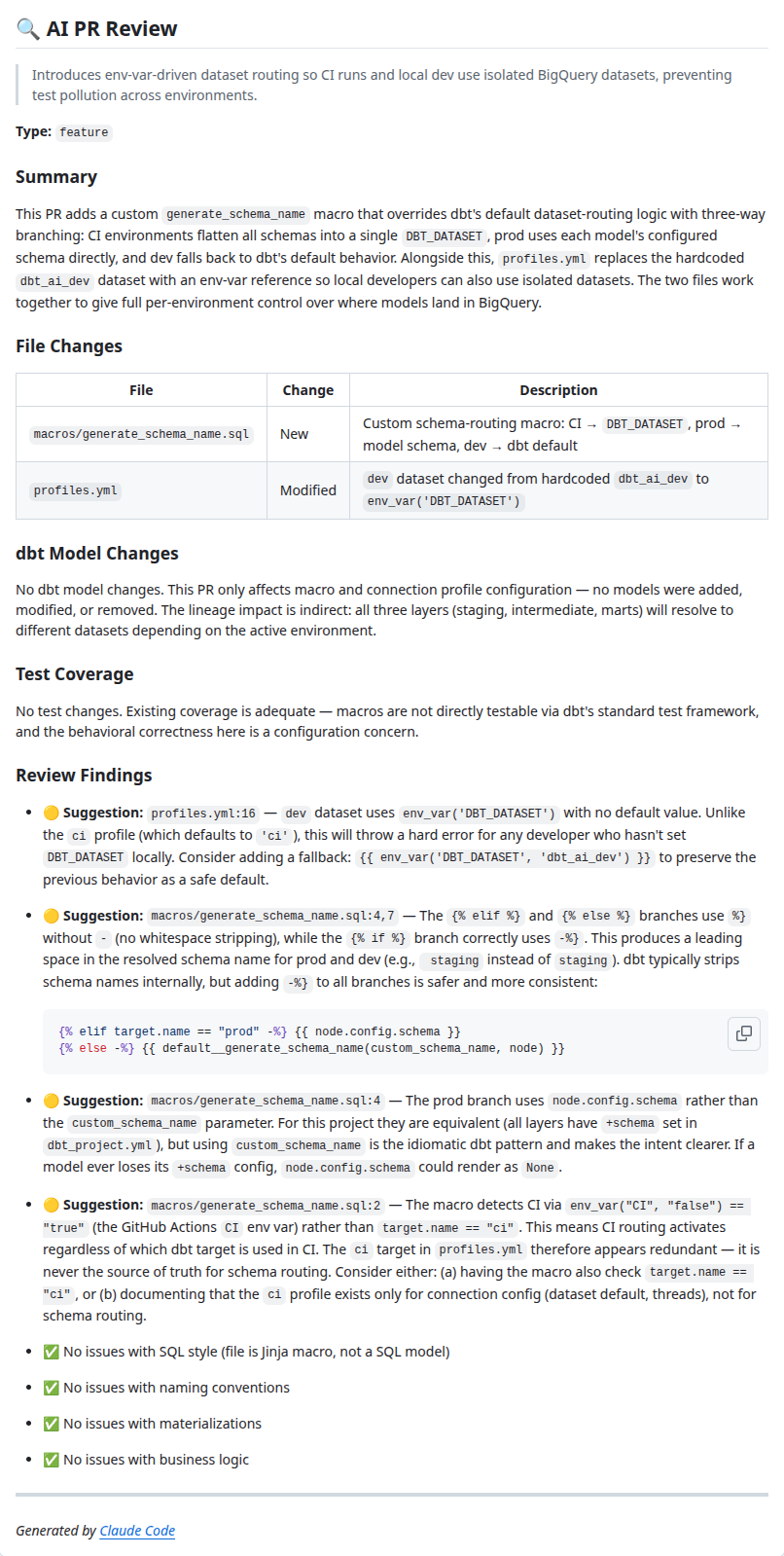
AI PR Review
Every pull request is reviewed by Claude as a senior dbt/analytics engineer. The review checks SQL style, naming conventions, test coverage, documentation completeness, etc. Findings are posted as a PR comment with severity levels: 🔴 Issue for bugs, 🟡 Suggestion for improvements, and ✅ All clear to confirm each category was checked.
-
Fix CI Failure
When the CI pipeline fails, Claude fetches the failed job logs, identifies the root cause (naming the specific step, model or test) and posts a PR comment with a concrete fix suggestion and the local commands to verify it, helping to speed up the developer's workflow.
Here is a simplified excerpt from the AI PR Review workflow:
- name: Analyze PR
  uses: anthropics/claude-code-action@v1
  with:
    claude_code_oauth_token: ${{ secrets.CLAUDE_CODE_OAUTH_TOKEN }}
    model: claude-opus-4-6
    prompt: |-
      You are a senior dbt/analytics engineer reviewing a PR.
      Check for:
      1. SQL Style: snake_case names, one column per line, CTEs over subqueries
      2. Naming: stg_, int_, dim_, fct_ prefixes
      3. Tests: not_null/unique on primary keys, relationships
      4. Documentation: model and column descriptions
      5. Performance: full table scans, missing incremental strategies
      6. Business Logic: verify computed columns are correct
      7. Materialisations: views for staging/intermediate, tables for marts
A key benefit is that the Claude instance running in the GitHub Workflow has access to the same CLAUDE.md file, slash commands, skills and hooks that are in your repo. So all the improvements you make to these files for your local development workflow also benefit your automated CI reviews.
"Every improvement you make for your local AI workflow also improves your automated CI reviews."
On production failure
When a Cloud Run job fails, a repository_dispatch webhook triggers an agentic workflow. Claude fetches the execution details and logs from Cloud Logging, determines the root cause, and either creates a fix PR with the necessary code changes or opens a GitHub issue (example) if the failure is an infrastructure problem rather than a code defect.
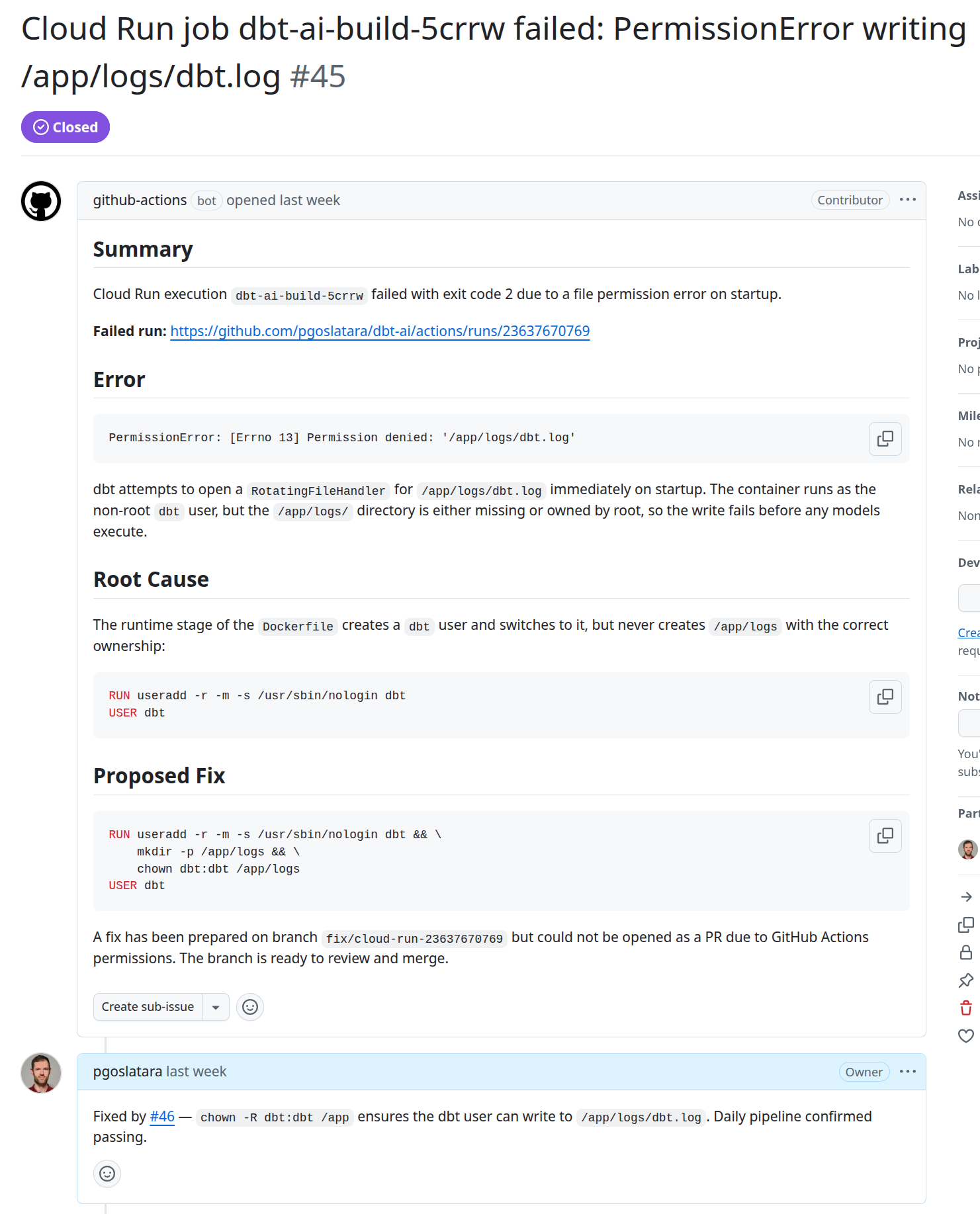
This is particularly useful for dbt projects where pipelines run overnight. Upon starting their workday a developer will already have an issue or pull request to review that relates to the overnight failure, reducing the time-to-resolution and removing the burden of finding relevant logs from the developer.
Security is in important factor with a workflow such as this. Giving Claude access to GCP services via the gcloud CLI and a read-only service account ensure it can access relevant information without potential to make breaking changes. Similarly, setting up branch protection prevents Claude from merging directly to main and ensures that all merged code was reviewed by a human.
Scheduled maintenance
Three weekly workflows run every Monday:
-
Abandoned Models Detection
Compares the dbt manifest against actual BigQuery datasets to find orphaned tables no longer defined in the project, generating cleanup SQL in a GitHub issue.
-
Codebase Review
Claude analyses the entire codebase for dbt best practice violations — undocumented models, naming convention breaches, incorrect materialisations, missing contracts on marts — and creates a categorised GitHub issue. This is particularly useful in dbt projects with many developers as there is greater potential for non-best practice code to be merged.
-
Data Quality Monitoring
Queries production BigQuery data for statistical anomalies such as volume spikes, duration outliers and data freshness issues, creating a GitHub issue with AI-analysed findings. Of interest especially for dbt projects that suffer from low quality source data that requires frequent analysis to ensure it still matches expectations.
Conclusion
AI will not replace analytics engineers, but analytics engineers who use AI effectively will outpace those who do not. Setting up your dbt project for AI-powered development is not a one-time effort, given the rapid rate of improvements in this area it is an ongoing process of encoding conventions, adding capabilities and refining workflows. As a result, some of what is presented in this post will likely be out of date within six months as the tooling evolves.
The approach described here — CLAUDE.md for conventions, MCP for tooling, skills and commands for interactive development, and agentic workflows for automation — provides a practical framework for embedding AI into every stage of your dbt lifecycle. Start small, iterate and keep humans focused on what they do best: understanding the business and making architectural decisions.
The full demo repository is available at github.com/pgoslatara/dbt-ai.
Looking to integrate AI into your dbt workflows? Our analytics engineer consultants are here to help — just contact us and we'll get back to you soon. Or are you an analytics engineer interested in learning more? Check out our training courses or have a look at our job openings.
Written by

Pádraic Slattery
Pádraic is a technical-minded engineer passionate about helping organizations derive business value from data. With experience in data engineering, Business Intelligence development, and data analysis, he specializes in data ingestion pipelines and DataOps.
Our Ideas
Explore More Blogs


Contact