About This Series
Microsoft Fabric makes it easy to get started with a single workspace and a single developer. As soon as you add a team, you run into messier questions: who works where, how to keep branches and workspaces in sync, and how to give everyone usable data without cloning the lakehouse repeatedly.
In part 1 we stayed inside a single workspace and focused on internal structure and naming. In this post we zoom out one level: how to set up multiple workspaces and Git branches so several developers can work in parallel without constantly rebuilding their own lakehouse.
The Problem: Multi‑Developer Chaos on Fabric
The happy path demo usually shows a single developer in a single workspace. Real projects don’t look like that. In real life:
- You have multiple people working on the same Fabric solution.
- Many of them prefer to work in the Fabric UI, not only in VS Code.
- You want Git integration for version control and deployments.
- Fabric’s Git integration uses a 1 workspace = 1 branch model.
That last point is where it gets interesting:
A workspace can be linked to one Git branch at a time. You can change which branch it points at, but it is always a one-to-one relationship.
This immediately raises a question:
- How do you let people work on different features at the same time,
- While still using the UI,
- And not stepping on each other’s toes?
On top of that, you quickly run into a second problem: data.
- Workspaces are not Git-synced.
- Notebook and pipeline definitions are Git-synced.
- Lakehouse and warehouse metadata is Git-synced, data is not.
So even if you solve the workspace/branch story, you can end up with feature workspaces that are technically “ready” but have no useful data attached.
This post focuses on the setup that makes both collaboration and data access workable.
Quick Recap: What Git Does (and Doesn’t) Sync
We only need a light mental model here:
| Item type | Git synced? | Notes |
|---|---|---|
| Workspace | No | Just a container. Binding to a branch is a setting, not in Git. |
| Lakehouse / Warehouse | Partially | Item + schema/metadata synced. Data is not in Git. Each workspace can have its own instance of a lakehouse item, but only some of them will actually contain data. |
| Notebook / Pipeline / Dataflow | Yes | Definitions stored as artifacts in Git. |
The key consequence:
A brand-new feature workspace linked to a branch will pull down notebooks, pipelines, semantic models and the empty shell of your lakehouse, but it won’t magically have a full copy of your lakehouse data.
When we talk about “rebuilding” or rehydrating a lakehouse in this context, we mean the full sequence of steps required to turn that empty shell into something useful for development again: rerunning ingestion pipelines, recreating tables, copying or restoring data, and sometimes fixing permissions and configurations.
If each developer treated “their” lakehouse as the primary data source, someone would still have to rehydrate that lakehouse: rerun ingestion, copy data, or do some manual import. That gets old very quickly.
Let’s first look at the workspace options teams typically consider.
Option 1: Everyone in the Same Dev Workspace and Branch
The most obvious setup:
- One Dev workspace.
- One branch (often
mainordevelop). - All developers work in that workspace, on that branch.
On paper:
- There’s only one place to find things.
- Nobody has to think about which workspace to open.
- Git integration “just” points to this one branch.
In practice you quickly hit issues:
- Interference – People overwrite each other’s changes because they’re working on the same items.
- Half-baked features – It’s hard to keep partially finished work out of the next deployment.
- No clean isolation – You cannot easily test a feature end-to-end without worrying about what someone else is doing right now.
- Git noise – Small “fix” commits from different features all land on the same branch and are hard to untangle in a PR.
When can this still be acceptable (but still not recommended)?
- Teams of 1.
-
Teams of 2, who:
- work on the same feature at the same time,
- and are very disciplined about coordination.
For almost everyone else, this becomes a bottleneck faster than you’d like to admit.
Option 2: Central Dev/Test/Prod + Personal Feature Workspaces
Microsoft’s recommended direction looks like this.
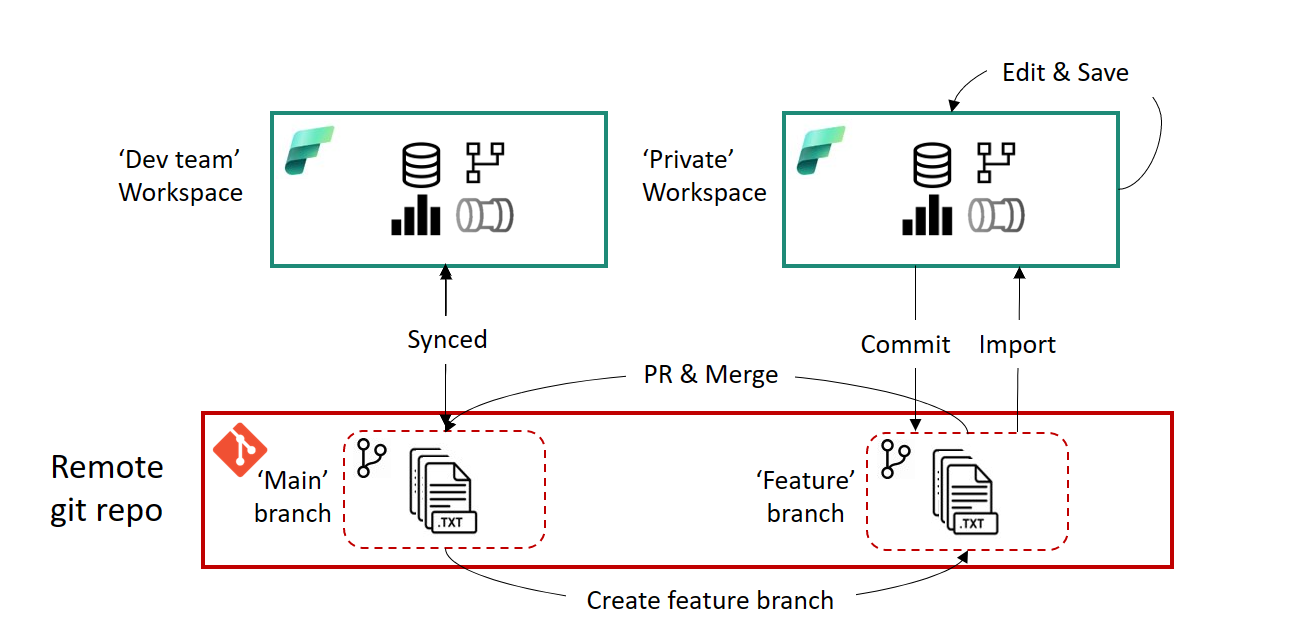
-
A set of central workspaces:
project1-devproject1-testproject1-prod
-
A set of personal workspaces, one per active developer:
project1-dev-rikproject1-dev-saraproject1-dev-joost- …
Together with a more classic Git branching model:
workspace-devis linked to themainbranch.- Each personal workspace is linked to a feature branch.
Conceptually this setup ticks a lot of boxes:
- Isolated areas per developer.
- Clean Git history and PRs.
- Central Dev/Test/Prod for shared environments.
But if you implement it naïvely, you hit the rehydration problem mentioned earlier.
Brand-new personal workspace + feature branch = code definitions and an empty lakehouse shell, but no useful data by default.
Principle: Only Central Workspaces Are Populated With Data
Here is the key idea that removes the “rehydrate lakehouse” pain while still giving everyone a lakehouse item in their workspace:
Lakehouses are synced to every workspace through Git, but only the central workspace is populated with real data. Feature workspaces have the same lakehouse definitions, but those stay mostly empty and are not the primary data source.
What this looks like:
- Central Dev workspace:
- Owns the main lakehouse with actual development data.
- Owns the pipelines that ingest into that lakehouse.
- Personal feature workspaces:
- Receive the same lakehouse artifacts through Git sync.
- Do not run full ingestion into their local copies.
- Notebooks and pipelines in these workspaces connect to the central Dev lakehouse for reading and writing, instead of relying on the local, mostly empty instance.
This is the bit that feels counterintuitive in Fabric’s UI:
- The default pattern is “attach notebook to a lakehouse in the same workspace”.
- Here, your notebook in
workspace-dev-rikwill intentionally work with the lakehouse that lives inworkspace-dev.
Why this is worth it:
When a developer creates a new feature workspace, links it to a branch and syncs, they can immediately run notebooks against real development data. No extra ingestion, no manual copy, no custom rehydration step.
You’ve separated two concerns:
- Where data actually lives and is curated → in stable, central workspaces.
- Where code is edited and branched → in flexible, branch-bound personal workspaces that just carry the lakehouse definitions.
Day-in-the-Life: Developer Flow
From a developer’s point of view, a typical feature looks like this:
-
Create a feature branch from
main
Example:feature/calculated-customer-metrics. -
Bind your personal workspace to the branch
Linkworkspace-dev-riktofeature/calculated-customer-metricsand sync. -
Connect notebooks/pipelines to the central lakehouse
- Attach to
lh_projectinworkspace-dev(or another central development workspace). - Optionally, write intermediate data to a dedicated schema or folder for your feature.
- Attach to
-
Develop and test
- Add or update notebooks and pipelines.
- Run them against shared development data without rehydrating anything in your own workspace.
-
Push and open a pull request
- Commit your changes.
- Open a PR into
main. - Let automated checks + code review do their work.
-
Merge and sync Dev
- Merge the PR.
- Sync
workspace-devwithmain. - From there, promote to Test/Prod via your chosen deployment flow.
At no point did you:
- Copy the entire lakehouse into each personal workspace, or
- Ask every developer to run a full ingestion job just to get started.
Cross‑Workspace Access: Great Power, Sharp Edges
Fabric lets you mix and match workspaces quite a bit:
- Pipelines can trigger other pipelines in another workspace.
- Notebooks can read/write data in a lakehouse that is not in the same workspace.
This is what enables patterns like:
- Separation between ingestion workspaces and transformation workspaces.
- Feature workspaces that read and write data in a shared development lakehouse.
- A central “orchestration” workspace that coordinates jobs across domains.
So far, so good. The sharp edge only appears when Git and deletes enter the picture.
Right now, Git sync can fail if a commit deletes an item in one workspace while that same item is still referenced from another workspace. When Dev tries to sync to that commit, Fabric detects that applying the delete would break those cross‑workspace references and refuses the sync.
A very common way this shows up is with feature workspaces setup.
Example: deleting a pipeline in a feature workspace
Imagine you have:
- A central Dev workspace bound to
main. - Two feature workspaces, each bound to its own branch.
- A shared pipeline called
pl_ingest_customers, synced to all of them from Git. - In one of the feature workspaces, another pipeline or dataflow still calls
pl_ingest_customers.
Now you decide that pl_ingest_customers is no longer needed for your feature:
- You delete
pl_ingest_customersin your feature workspace. - You commit and open a PR, merging that delete into
main. - You sync the Dev workspace to the new
main.
From Git’s point of view, the commit says: “pl_ingest_customers is gone.”
But in the other feature workspace, there’s still a pipeline or dataflow that references pl_ingest_customers.
When Dev tries to sync:
- Fabric sees that applying the delete would break that other reference.
- It refuses the sync and surfaces an error.
From your perspective this feels like:
I just cleaned up a pipeline in my feature workspace, why can’t Dev sync anymore?
From Fabric’s perspective, it’s preventing you from breaking another workspace that relies on the same repository.
What to do with this in practice
This safety net is useful, but it does mean you have to be deliberate about where you create dependencies between items.
Rules of thumb:
- Keep most item dependencies inside a single workspace
If a pipeline or dataflow calls another pipeline, prefer to keep that relationship within one workspace instead of spreading it over several. - Prefer data-based integration across workspaces
Reading and writing tables or files in a shared lakehouse is much less likely to cause Git delete conflicts than chaining pipelines or datasets across workspaces.
How this fits the centralized lakehouse pattern
For the centralized lakehouse setup in this post, that boils down to:
- It’s fine that all workspaces depend on the central lakehouse
You don’t plan to delete that lakehouse; it’s the shared backbone of your solution. - Be much more cautious with shared pipelines, dataflows and notebooks
Either:- keep those dependencies entirely inside one central workspace, or
- manage them carefully and coordinate deletions.
By keeping almost all item‑to‑item dependencies local to a workspace, and only centralising the lakehouse itself, you greatly reduce the chance that a small clean‑up in one feature branch ends up blocking Git sync for everyone else.
Do’s and Don’ts for Workspace Scaling
To make this concrete, here’s a quick list you can turn into team conventions.
Do’s
- Do use centralized workspaces to own populated lakehouses
Dev, Test, and Prod lakehouses with real data live in a small number of stable workspaces. - Do let lakehouse definitions sync to feature workspaces via Git
This keeps schemas and table structures aligned without copying the full data. - Do give each active developer a personal workspace
Linked to their feature branch; this keeps features isolated. - Do standardize the developer workflow
“Branch → bind workspace → develop → PR → merge → sync Dev” should be documented and boring. - Do be explicit about cross-workspace access
Decide which workspaces can use items in other workspaces and under what conditions.
Don’ts
- Don’t put all developers in a single Dev workspace and branch by default
It may look simple but almost always breaks down beyond a very small team. - Don’t fully populate the lakehouse in every feature workspace
That just multiplies ingestion effort and increases the risk of data drift. - Don’t hide rehydration steps in tribal knowledge
If any workspace needs data copy or backfill, automate it and surface it as a clear, repeatable step.
Summary
With an internal structure (part 1) and a multi-developer workspace setup (this post), you have a skeleton that scales both in depth (more artifacts) and width (more developers).
If you’re experimenting with your own workspace topology and run into sharp edges, especially around cross-workspace dependencies and Git sync, I’d love to hear your experiences—they’re exactly the kind of real-world feedback this series is built on.
Written by

Rik Adegeest
Rik is a dedicated Data Engineer with a passion for applying data to solve complex problems and create scalable, reliable, and high-performing solutions. With a strong foundation in programming and a commitment to continuous improvement, Rik thrives on challenging projects that offer opportunities for optimization and innovation.


Contact