About This Series
Building a data solutions on Microsoft Fabric involves tackling common challenges every team encounters: workspace organization, naming conventions, deployment pipelines, validation frameworks, cluster sizing and many others. Early projects often waste valuable time thinking about these basics, when the focus could also be on the actual building on the platform.
This series shares the opinionated, field-tested patterns Xebia's Data Engineers settled on after multiple proof-of-concepts and production deliveries. Think of it as a shortcut: copy what works, adapt where your context differs, and spend your energy on the actual data engineering.
The Problem: Workspace Chaos
Open any Fabric workspace a few weeks into a project and you'll often find chaos: notebooks dumped at root, pipelines named "Test" or "Ingest2_final", tables everywhere, someone tried a prefix scheme (`raw_`, `bronze_`), someone else ignored it. The result: New project members spent a lot of time searching for functionalities and changes are risky because nobody knows what triggers what.
Here's what that mess looks like:
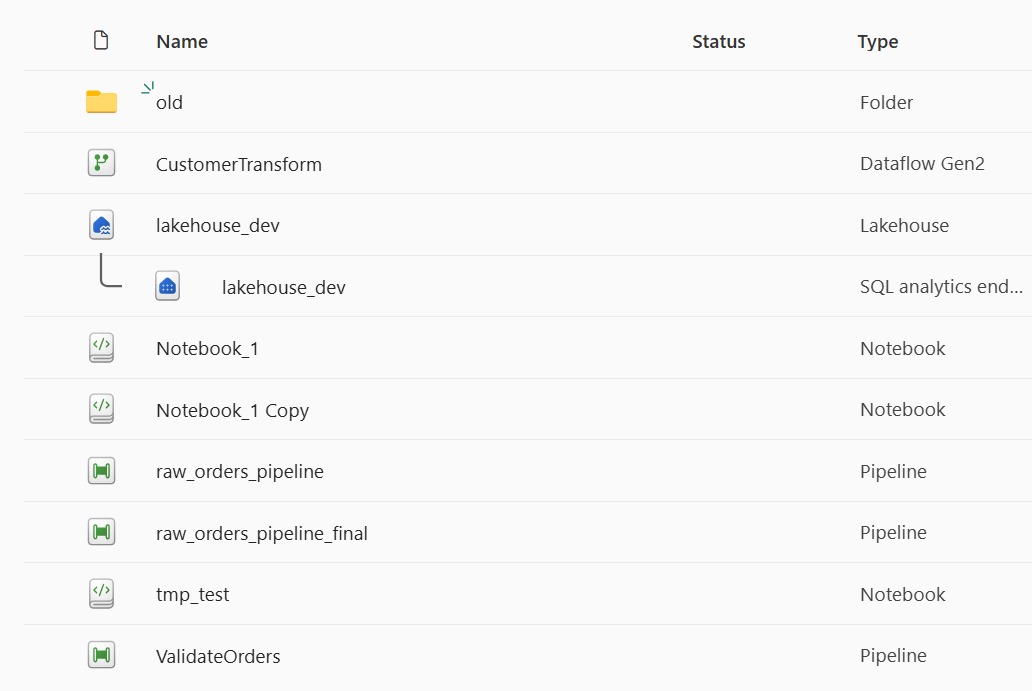
This post's fix: A simple, ordered structure that makes "where does this go?" obvious. Numbered stage folders at the top (1_ingest, 2_validate, 3_transform), shared assets at root, no item prefixes baked into object names, and the lakehouse item positioned where people expect data. Discoverability beats cleverness.
Quick Fabric Concepts (30-Second Glossary)
| Term | One-liner |
|---|---|
| Lakehouse | Storage + metadata friendly interface for files & tables. |
| Pipeline | Orchestration unit to schedule or chain activities (ingest, run notebooks). |
| Notebook | Interactive code (Spark / Python / SQL) for transformations & exploration. |
That's all we need for this post.
Why Structure (Not Prefixes) Wins & Guiding Principles
Instead of easing the mess with longer or clever names, we make it disappear with a predictable skeleton.
Why skip prefixes? Fabric's UI already shows icons for pipelines, notebooks, and tables, you can see what something is at a glance. Adding pl_, nb_, or tbl_ prefixes (common in Azure conventions) just creates noise. Instead, we leverage folders for logical groupings (stages like 1_ingest/, 2_validate/) so the structure tells the story, not the name.
Here's the solution first so you can anchor everything that follows:

Zero guesswork – A teammate adding a new quality check goes straight to 2_validate/notebooks without asking.
Guiding principles:
- Descriptive names – Plain words ("validate_orders") over abbreviations; icons + folder give enough context.
- Stage vs Root – Stage folders contain artifacts only that stage needs. Anything reused (tables, helpers) sits at root so you don't duplicate or guess.
- Process ordering – Numbers communicate sequence at a glance; no decoding required.
- Consistency over creativity – One
verb_objectpattern and casing style keeps scanning fast.
Stage vs Root
If only one stage needs it (an ingest-specific notebook, a validation pipeline), it goes inside that stage folder. If multiple stages use it (the lakehouse, a config file, a shared utility), it lives at root. This kills duplication and the "where did I put that helper?" hunt.
Think of stages as logical groupings for a slice of flow. Each stage holds only what that phase of processing requires to run. Anything that multiple phases rely on moves to root (lakehouse, config/, utils/). That clear boundary is the main reason people stop guessing.
Inside a stage apply the same simplicity rule: keep it flat until finding things slows you down. One notebook? Drop it straight in. A handful? Still flat. Only introduce a minimal subfolder (domain, source system, business area) after real navigation friction appears. Depth is a tax, add it deliberately.
Evolving the Structure
Start minimal, grow deliberately. The skeleton above works for most single-team workspaces. Expand only when pain appears:
When to add a new stage: Need a curated layer for BI consumption? Add 4_publish/ with notebooks that shape data specifically for reporting. Need a raw landing zone separate from transformation? Introduce an extra stage and rename the existing ones so the numbers reflect the new flow (for example: 1_land/, 2_ingest/, 3_validate/, 4_transform/, 5_publish/). Let the flow dictate the stages, not the other way around.
When to add domain folders: A stage holding 15+ notebooks becomes hard to scan. At that point, group by domain, source system, or business area inside the stage folder (e.g., 2_validate/notebooks/finance/, 2_validate/notebooks/marketing/). Avoid adding layers earlier, they just bring noise.
Quick Anti-Patterns (What to Avoid)
| Smell | Why It Hurts | Fix |
|---|---|---|
| 50 items flat at root | No process order; scanning takes minutes instead of seconds | Move stage-specific items into numbered folders |
final_final_transform.ipynb | Version chaos; Git history tells the real story, not filenames | Use Git branches/commits, keep one canonical name |
Mixed CamelCase + snake_case | Slows scanning; inconsistency forces mental translation | Pick one style, enforce in code reviews |
| Over-nested folders | 1_ingest/sources/api/customers/raw/ is 5 layers deep for one file | Stay flat until navigation pain forces a split |
What's Next
Over the coming months, we'll be sharing more articles in this series, covering different aspects of building on Microsoft Fabric. If you have requests for specific topics or feedback on this setup, feel free to reach out or share your ideas, your input is welcome!
Written by

Rik Adegeest
Rik is a dedicated Data Engineer with a passion for applying data to solve complex problems and create scalable, reliable, and high-performing solutions. With a strong foundation in programming and a commitment to continuous improvement, Rik thrives on challenging projects that offer opportunities for optimization and innovation.


Contact