Blog
3 things just became easier in pandas 3
Guaranteed copy-on-write? Default string dtypes? New object pd.col()? Say hello to these quality-of-life wins in pandas 3.0!


relax... the new pandas 3 release has got you covered
Pandas 3.0 has finally landed! And with it? A handful of changes that are going to make your life noticeably easier.
Ok, nothing that'll make you rethink your whole career (it's not that dramatic), but the kind of quality-of-life improvements that make you wonder how you ever lived without them.
Maybe you've been wrestling with column references in your chains, squinting at that object dtype on your string columns, or getting haunted by the ghost of SettingWithCopyWarning… Well, pandas has heard your cries! Let's get into it.
The new pandas pd.col() object
One of my favourite things about teaching coding is when you have to explain each language's little quirks. SQL needs to be written in a strict order, but at run time is read in a different order. The assignment operator in R is <- although = will work the same way, unless it's in a function call (amusingly -> also works, it's just never used.).
And pandas is no different. In fact it's a big culprit of these "huh?" moments. It's not that these things are weird, or not by design. They just require us to think a little differently about how pandas sees the world and how we see the world.
When selecting a column in a pandas DataFrame, the code is pretty straightforward:
employees['team']But now if you try and filter with that column, say you want everyone in the team 'marketing', the code becomes quite cumbersome:
employees[employees['team'] == 'marketing']Note where it is needed to specify the DataFrame name: Once when specifying the filter condition, and again to specify on which DataFrame to use it. The column team only exists inside employees and not as a standalone variable in Python's namespace. This is by design, unlike SQL or R, Python doesn't expose column names as variables when evaluating expressions.
This wasn't a problem in pandas 2, as long as you followed the rules.
This wasn't a problem in pandas 2, as long as you followed the rules. Well that is until you want to do chaining… which let's face it you should be! It is the nicest way to work in pandas.
Now, let's say you want to create a new column and then filter by that column. How can you do that using what we know? (that a column exists inside a DataFrame that needs to be referenced).
For example the following will not work – can you see why?
(
    employees
    .assign(tenure = (pd.Timestamp.today() - employees["start"]).dt.days/365)
    .loc[employees['tenure'] > 15]
)
The issue is on line 4: The filter looks the same as before… .loc[employees['tenure'] > 15]… but tenure does not exist in original employees DataFrame. Therefore it cannot be referenced in this way.
In our training Python for Data Analysis and Data Science with Python, we teach students how to use the lambda function. This allows us to suggest the method of filtering, rather than the physical representation of the filter. Meaning you only need to specify the DataFrame name once, at the beginning, and never repeat it later in the chain.
But check out this boilerplate:
(
    employees
    .assign(tenure = (pd.Timestamp.today() - employees['start']).dt.days/365)
    .loc[lambda df: df['tenure'] > 15]
)😮💨 Phew!
Now the code is even harder to read, especially given that employees is referred to in the assign step, but is not in .loc.
Let's see how pandas 3.0 rewrites this query:
(
    employees
    .assign(tenure = (pd.Timestamp.today() - pd.col('start')).dt.days/365)
    .loc[pd.col('tenure') > 15]
)
While it may not be immediately apparent, the replacement of lambda df: df by pd.col is a significant change. You can now generate a deferred object to represent the column of a DataFrame, without needing to represent the column object directly.
This is going to make your code more:
- consistent: we see this pattern across other modern data stacks such as Spark, Polars or Ibis
- readable:
pd.colis a clear pandas object versuslambda df: df - scalable: no more looking for all DataFrame references mid-chain
This change is what they like to call 🍬 syntactic sugar 🍬 - delicious but nothing more than cosmestic
Will it make the code more efficient when executed? Well… no. The library pandas is still not designed for optimizing performance on larger data. This change is what they like to call 🍬 syntactic sugar 🍬 - delicious but nothing more than cosmetic.
But! With this placeholder here, maybe this leaves the door open for making pandas a more optimal library?
String data dtypes by default
"Everything in Python is an object" People love that one…
But! Have you ever read a DataFrame, looked at the datatypes and thought "Why were my strings parsed as dtype object?"
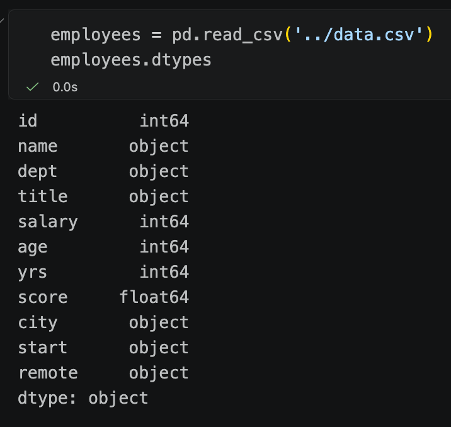
Or checked out the columns of a DataFrame and thought “What does it mean by object?”
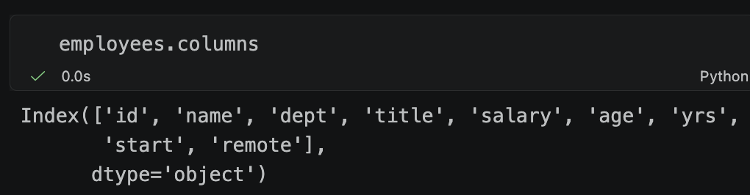
Well that’s because pandas is built on top of NumPy’s type system, which predates the need for a proper string dtype. NumPy’s design is for fixed-size homogenous data where every element takes up the same amount of memory… Great for integers/floats/booleans – but will a string be 3 characters “Hi!” – or more – “hippopotomonstrosesquippedaliophobia”?
That second string is the term for the fear of long words by the way… ironic.
Step aside pandas 2, there’s a new version in town… and this one has string dtypes as default
Of course in pandas 1.0 (2020) they introduced string dtypes in pandas, but they weren’t parsed by default… you had to want strings and really mean it.
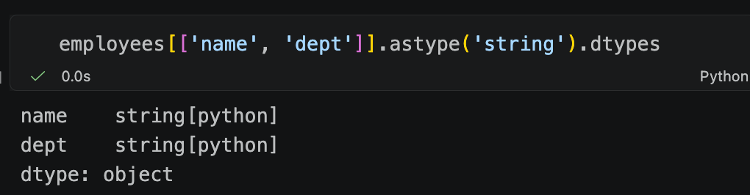
Step aside pandas 2, there’s a new version in town… and this one has string dtypes as default.
Now it’s as simple as 1, 2, read_csv:
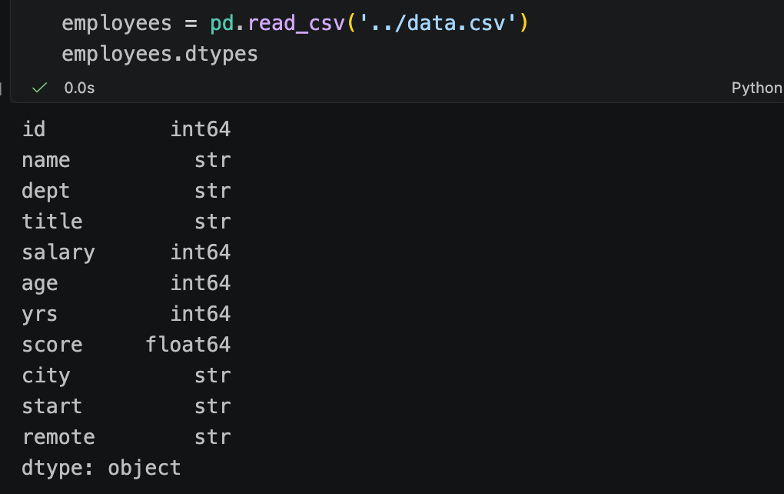
We see that all of those string columns – name, dept, title etc. are now string dtypes by default.
You might think that this is also just some sweet sweet treat like our syntactic sugar above… but there will be performance benefits too, and not just marginal ones. Benchmarks across diverse DataFrames show over 50% memory savings on average, compared to the old object dtype. It doesn't stop with memory… operations are slated to run 2-27x times faster. More specifically, groupby operations typically run 2-4x faster on the string dtype than on the object dtype. Cutting memory usage roughly in half is a big deal for large DataFrames! And the speed gains are a nice juicy bonus on top.
Note: A lovely quirk of this, is that the output given here is a series – and the series dtype is object. Shouldn't they be strings as default? Well no… because the actual values in this output aren't strings – they are NumPy's nullable dtypes. We can see this by grabbing the first-row value:
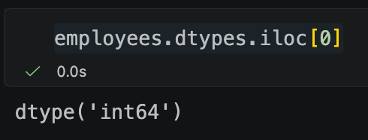
So, there will still be questions on what does object mean in this output? but there will definitely be fewer of them – and they will no longer be questions about your important string columns!
SettingWithCopyWarning
Ever seen this annoying (and hard to explain) SettingWithCopyWarning?

I always found this one of the most difficult things to explain. SettingWithCopyWarning? What does that even mean?
What was happening under the hood in pandas 2 was not only confusing... it was inconsistent
The logic is clear… I want to make a subset of the data for employees who have been working longer than 8 years and then increase the salary by 10%. Why, if I'm making a change to a copy, do I need to get a warning? And if it's a warning… can I just ignore it?
What was happening under the hood in pandas 2.0 is not only confusing, it was inconsistent. The library is deciding whether the slice should share the same memory as the original DataFrame (i.e. it creates a view) or whether it should get its own independent copy.
In this case, it creates the independent copy. We can see this by checking if the original data changed.
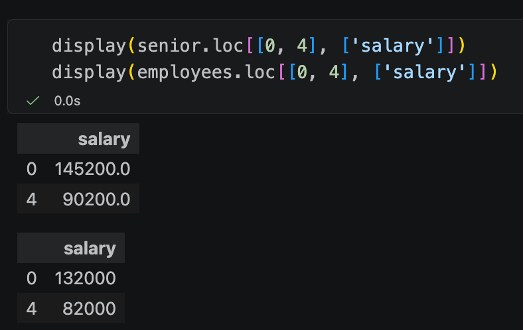
But look what happens below, when we create a different slice… say we only take one column to make a pandas Series called salaries, then use that slice to replace the first value of this column with -999999.

Ok, I'll admit the above code is quite strange… and I'll also admit that I've seen stranger work arounds in production code… but the logic behind the syntax being used here is the same as the first. We make a subset of the data, we modify the subset of the data. But hidden underneath all of this is pandas making decisions about what memory to use, and therefore leading to bad, often unseen, side effects.
This can be further demonstrated by looking at the ids for each object. Note how Python's id does change in the first slice, but does not change in the second.
slice 1:
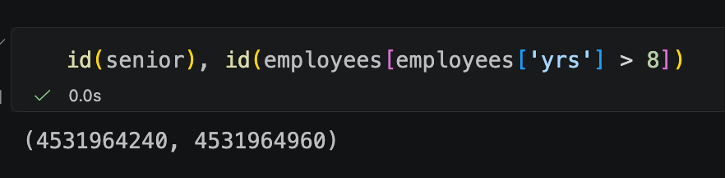
slice 2:
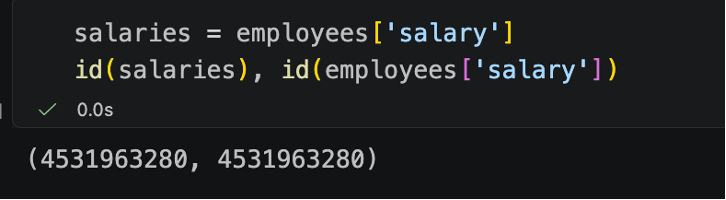
The decision to create copies is decided under the hood by pandas depending on whether pandas can return a contiguous block of the underlying array without copying it.
Wait… so you're telling me that with the same logic intent – modifying a subset – different outputs can happen? And that this was not determined by my logic, but by pandas memory limitations?
Getting a copy of a slice was not guaranteed in early versions, but in pandas 3.0 this is now a guarantee.
Which means we can apply all sorts of illogical code like before.
But then it is illogical not because of pandas, and any surprising output is due to our own input – so then maybe we just need to think about what we are trying to do and why.
So, what did we actually get with pandas 3.0?
Three things that'll make your code cleaner, clearer, and a little less likely to make a new learner stare blankly at their screen:
- More readable code:
pd.col()replaces thelambda df: df['col']boilerplate, making chained operations finally look like something an actual human wrote - Clearer datatypes: strings are now parsed as strings by default, so no more explaining why your
namecolumn is anobject - Consistent behavior: copy-on-write is now a guarantee with slices, pandas no longer makes secret decisions at runtime, so the same logic will always produce the same result
Performance optimization isn’t the driving force behind these changes - pandas still isn't trying to out-muscle Polars. But all of them do make the library a joy to teach, easier to read, and more consistent within the broader modern data stack.
Small things, big difference!
Interest in seeing these changes in action? Come check out our upcoming courses!
Written by
Our Ideas
Explore More Blogs


Contact