At the beginning of 2025, many data professionals—ourselves included—were still figuring out how agents and LLMs fit into real-world projects. LinkedIn was full of posts showcasing the potential for new agentic workflows, making it seem that problems were being easily solved, with the implication that simple prompts and workflows could automate an employee or even an entire department. After working on developing and deploying agents for production over the past year, we see now how naive that perception was.
The fact is that agents show huge potential, but for some tasks and business problems, they need to be adapted and carefully designed to fulfil their promises. There are some hard lessons to be learned. We made a lot of mistakes on the way, and that's why we decided to share those lessons with you.
What we've found is that problems don't appear when you're building your first simple agent. They emerge as your workflows grow in complexity: when you chain multiple agents together, when tools return large amounts of data, when conversations span many turns. The patterns we share here are not novel inventions, but practical solutions we discovered (sometimes painfully) as our production systems scaled.
Whether you're just starting with agents or looking to improve existing implementations, you'll find practical advice on what not to do and how you can improve both your developer experience and your application. Those tips include improving your agentic architecture, writing better tools, and being aware of the importance of implementing tracing and evaluation from the project's outset.
What is an AI Agent?
At its core, an AI agent is an LLM equipped with tools that allow it to complete complex, multi-step tasks. Unlike a simple chatbot that only generates text, an agent can interact with the outside world using tools to query databases, search the web, send emails, or call APIs.
The basic flow is straightforward: a user provides a prompt, the agent decides which tools to use, executes them, processes the results, and either continues working by calling more tools, or returns a final answer. This loop continues until the task is complete. The diagram below illustrates a single-agent workflow.
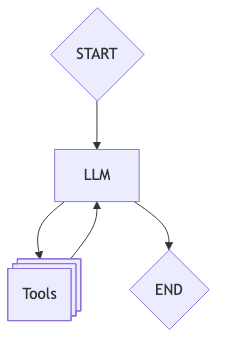
Examples of tools include web search functionality, API calls, and database interactions. These are the ways the LLM can interact with external systems, and based on the provided outputs, it reasons about next steps, either calling another tool (or the same one with different parameters) or ending the loop by returning the result to the user.
The problem: Context window constraints
The concept of an agent is simple: all one needs is an LLM and some tools. Frameworks such as LangGraph and Pydantic AI allow you to define an agent within minutes. It seems so easy. What can go wrong?
The first significant issue we encountered was the context window. Our agents with access to web search tools would find and extract information from huge webpages, filling up the context window. Users would see nondescriptive error messages, and when that happens, you have a problem.
How Context Accumulates
Every LLM has a context window, that is, the maximum amount of information it can consider at once. Modern models boast impressive windows from 200k+ tokens up to 2M tokens, but here's the catch: context fills up fast, and not all of it receives equal attention.
With each interaction, your context grows. It includes the system prompt, the user's query, the agent's response, any tool definitions, tool calls, and tool results. In a multi-turn conversation, previous exchanges also consume context. What starts as a simple prompt can quickly balloon into a massive context that pushes against the model's limits.

But even if your context technically fits within the window, there's a deeper problem: LLMs don't attend equally to all parts of a large context. It's almost like asking a colleague to read a book and then asking them for a tiny detail on page 121. They probably won't remember. We've seen this firsthand: an agent instructed to find information about a product's availability in Mexico, after combing through thousands of pages of web content, replied with a poem in Spanish. The agent had forgotten its original objective, lost in the noise of accumulated context.
The key difference between a simple LLM call and an agent is that agents, by definition, will have a reasoning step that may decide to call another tool because the task is not yet complete. Therefore, a combination of poor tool design (resulting in significant backtracking to the LLM) and inadequate context management can cause you to exceed context limits, leading the LLM to return an error (or worse: return nothing at all).

One straightforward way to deal with context window limitation is to trim message history. In this approach, we simply delete or filter messages that might not be relevant to the task. For instance, if the agent interacts with users in a chat structure, we can filter out old messages and keep the most recent ones. The limitation is that the agent might lose relevant context for the task at hand. Therefore, for more complex workflows, we need a smarter approach.
Structured outputs
A more robust solution we suggest is to better manage your tool results by providing structured output schemas. This proved to be beneficial in multiple ways:
- You can define which fields and information you want to extract specifically from your tool call.
- You can reference the field directly that you want to pass on to your next agent or context history. For instance, if only the price is relevant, you can easily select that field from the provided structured response.
- You reduce the main agent's context dramatically—in our experiments, structured outputs reduced the data returned to the main agent by 90-98% compared to raw web content. Note that the intermediate LLM still processes the full content, so total token usage across the system isn't necessarily reduced. However, the real benefits are significant: the main agent can make more tool calls without hitting context limits, its attention stays focused on relevant information (smaller context means better reasoning), and subsequent calls in the agent's loop are cheaper since they carry a smaller context.
- For subsequent tasks, you enhance the agent's capacity for reasoning by providing focused, accurate information rather than noisy raw content.
- Perhaps unexpectedly, defining schemas forces you to have conversations with stakeholders about what data actually matters. This requirement—knowing upfront which fields to extract—might seem like a constraint, but it becomes a feature: it makes your agents more predictable and gives you explicit control over what flows through your system.
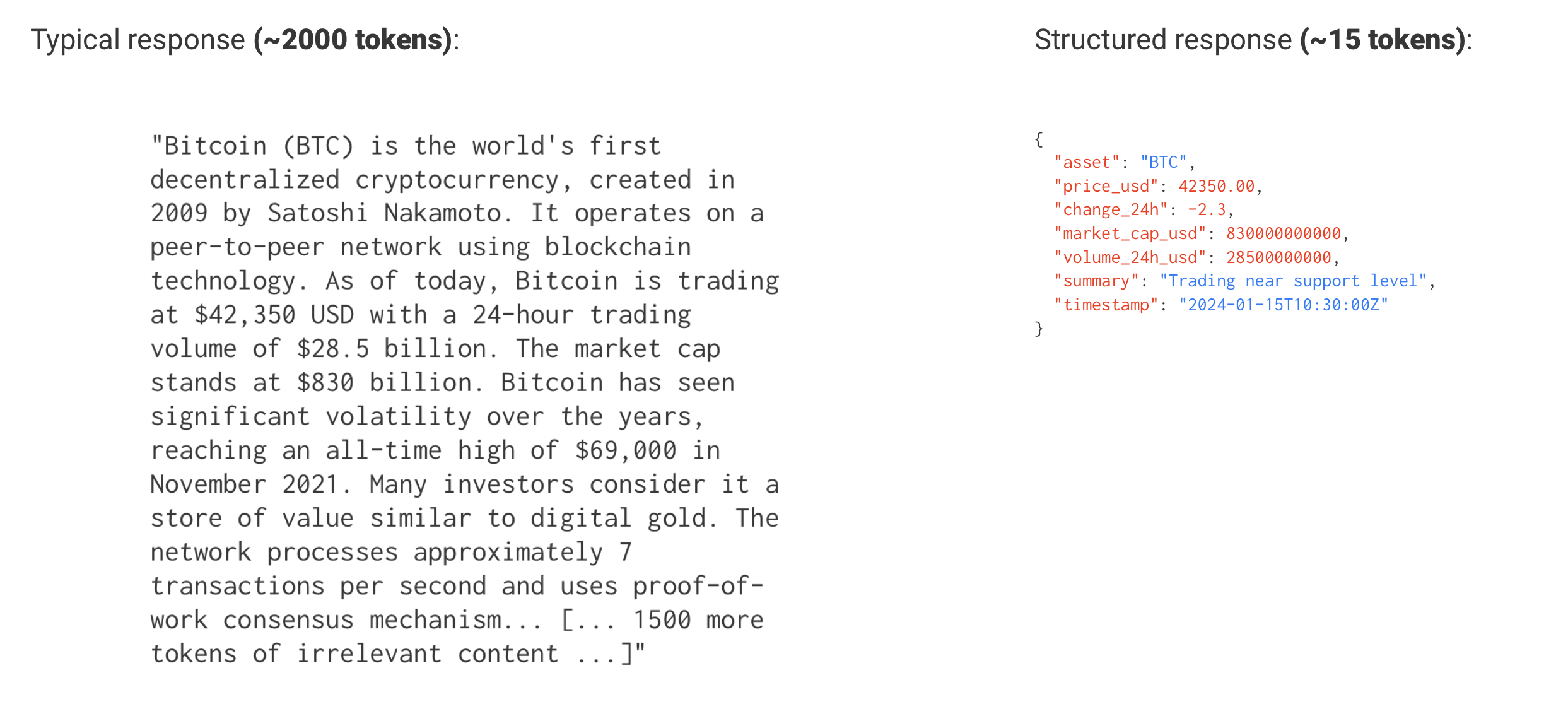
The example below shows a class that captures only the relevant Bitcoin price information using a Pydantic model:
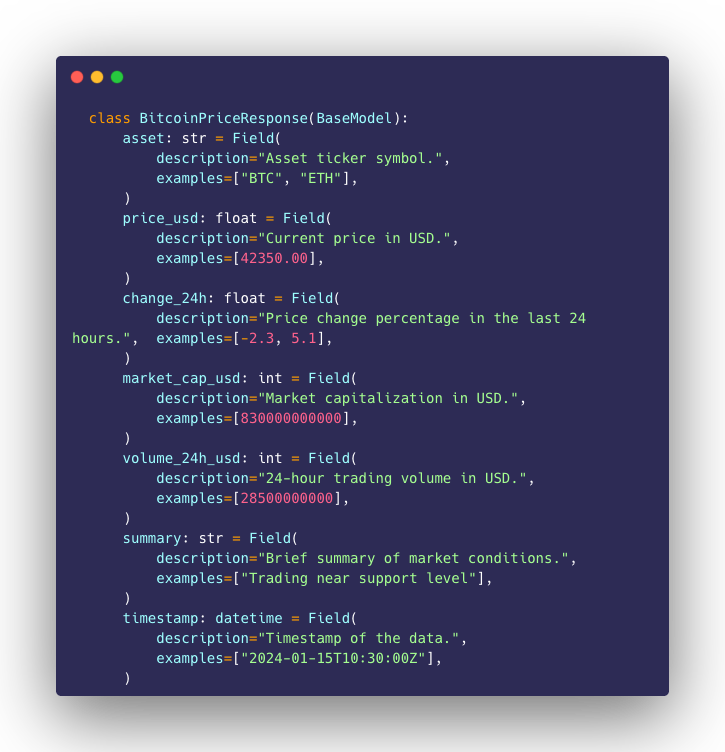
Then, we embed an LLM directly in the tool. For each web search call, before returning results to the main agent, this embedded LLM extracts and structures the relevant information:
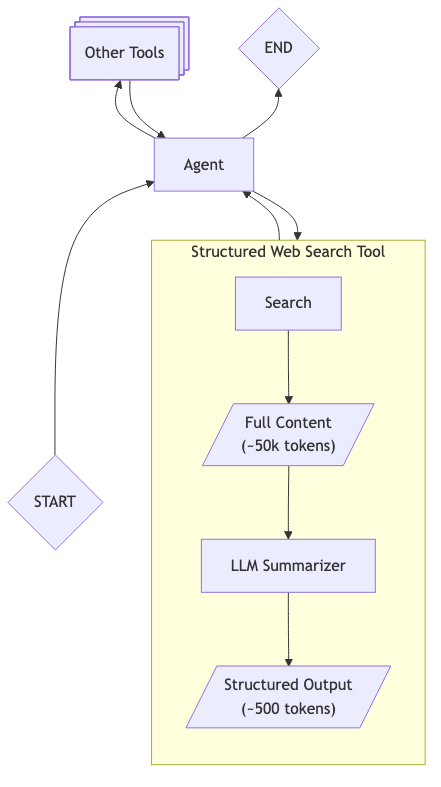
This approach allows the agent to have a better context for making a decision on whether to continue with web search to complement information or simply finish and return a response to the user.
Note how this per-tool-call extraction differs from only trimming message history when context limits are reached. By processing each tool result individually, we optimize accuracy and keep the LLM focused on extracting relevant information from one source at a time.
There is a trade-off: this approach adds latency since every tool call now requires an additional LLM invocation for structuring. However, you can mitigate this by parallelizing tool calls where possible. More importantly, the alternative—hitting context limits or having agents lose track of their objectives—is far worse for user experience. We found the latency cost acceptable given the gains in reliability and the ability to handle complex, multi-step workflows that would otherwise fail.
Structured outputs are not a silver bullet, and the pattern of using an LLM to structure tool results is not new. But applying it systematically to multi-agent workflows proved highly effective for us: the main agent's context stays lean, enabling more tool calls, better reasoning, and explicit control over what data flows through your system.
Note that structured outputs are not a complete solution on their own. Context can still grow indefinitely across many turns, so tracking agent calls, checking message history, and removing unnecessary content might still be relevant to your use case.
Conclusion
In this first blog post in the series, we've shared patterns we learned while scaling our agent workflows to production. The problem we describe—context growing out of control and agents losing focus—doesn't appear in simple demos. It emerges when your workflows grow complex, when you chain multiple agents, when tools return large amounts of data.
The approach comes with trade-offs. You need to define your schemas upfront, which requires knowing what data matters. You add latency with the extra LLM call per tool. But we found these trade-offs worthwhile: the schema requirement forced valuable conversations with stakeholders, and the reliability gains far outweighed the latency cost.
In the next iteration, we will go even further into how to mitigate these problems by presenting a multi-agent architecture that focuses on creating specialised sub-agents to work on a multitude of different tasks.
Written by

Victor De Oliveira
I appreciate feedback: https://www.linkedin.com/in/victor-de-oliveira-b0634449/
Our Ideas
Explore More Blogs

The RockBot Band – A Multi-Agent AI System
Over the past several months I’ve been building a set of open source projects that each solve a specific problem in the AI agent space. Individually...
Rockford Lhotka


Contact