


Blog
Beyond the support matrix: Greengrass V2 on Windows over VSAT

AWS officially supports Greengrass V2 on Windows Server 2019 and 2022. We ran it on Windows Server 2025, on cloned virtual machines, over a satellite link, in a fleet where remote access could not be assumed. Most of it worked.
Greengrass itself was not the hard part. The hard part was everything around it: Windows service identity, certificate ownership, Sysprep timing, provisioning lifecycle, low bandwidth deployments, and operational verification when nobody can reliably remote into the device. If you are planning an edge deployment in a similar environment, the takeaway is to treat identity, provisioning lifecycle, and network unreliability as design inputs from the beginning.
In our deployment, Greengrass V2 ran as NT AUTHORITY\SYSTEM, over a 0.35 Mbps VSAT uplink with ~580 ms round trip latency, across a maritime fleet whose vessels spend most of their time out of port. The platform has been running in production at fleet scale.
AWS docs cover some of these pieces separately: Windows Greengrass installation, FleetProvisioningByClaim, component recipes, and core device APIs. Microsoft docs cover Windows EFS and Sysprep. What we did not find was a single path for how these pieces behave together. And when you stack them, gaps appear that no single doc surfaces.
This post walks through the five gaps that mattered most in our rollout:
- What changes when Greengrass runs on Windows.
- How to handle certificates safely across Sysprep and cloned machines.
- How to know when
FleetProvisioningByClaimis actually finished. - What satellite bandwidth does to deployment design.
- How to verify vessels from AWS when device side access is unavailable.
Background: why this was not a normal Greengrass setup
A normal Greengrass setup often starts with a supported Linux device, a steady internet connection, and an installation flow that can assume the device is reachable during setup and troubleshooting. The official examples and community knowledge are also largely Linux first. That model is reasonable for many factories, gateways, and lab environments.
Our environment was different in several important ways.
The operating system was Windows Server 2025. Greengrass on Windows runs as a Windows service, with the nucleus running as NT AUTHORITY\SYSTEM. Generic components run under a configured component user, typically ggc_user, whose credentials must be stored in the SYSTEM context Credential Manager. That means filesystem access, process identity, environment variables, scheduled tasks, and certificate readability all follow Windows identity rules, not POSIX assumptions.
The devices were cloned virtual machines. We built a golden image, transferred it to vessel hosts, and completed vessel specific provisioning after first boot. This introduced a sharp boundary: static software could be baked into the image, but identity-bound material had to be created only after the clone was running under its final machine identity.
The network was VSAT. A 0.35 Mbps uplink with high latency changes the meaning of "just redeploy" or "download the artifact again." Partial progress is normal. A small operational mistake that is harmless in an office can take a fleet a working day to recover from.
Finally, device access was not guaranteed. RDP might be too slow, unavailable, or not authorized. The operational model had to assume that health checks should come from the AWS control plane, not from logging into the vessel.
Those constraints explain the design decisions in the rest of the post: bake only static software into the golden image, defer certificates and per-vessel identity to first boot, avoid interrupting provisioning, keep deployments small and immutable, and build verification around AWS APIs.
What changes when Greengrass runs on Windows?
If you are coming from a Linux Greengrass deployment, your mental model needs a few adjustments before the rest of this post makes sense.
Greengrass on Windows runs as a Windows service. The nucleus itself runs as NT AUTHORITY\SYSTEM. Generic components run as a configured component user, typically ggc_user, a local account you create and register in the LocalSystem Credential Manager (usually via PsExec, since the credentials need to be readable by the SYSTEM context Greengrass service). Individual lifecycle steps can opt back into the nucleus identity with RequiresPrivilege: true when they need to run outside the component user.
A component that works under your Administrator session may fail at runtime under SYSTEM, and the reverse is also true. The practical rule: if Greengrass will run it, test it as the identity Greengrass will use. Administrator success is useful for debugging, but it is not proof that the edge runtime can operate.
One small Windows specific trap was the recipe model. In the versions we tested, multi-line Script blocks behaved as separate cmd.exe invocations per line. That means variables, cd, and chained commands may not behave the way they would in a Linux shell. Chain commands inside a single line with &&, or call a .cmd or .ps1 file from artifacts/ as one command.
Two smaller things to plan for, both Windows specific:
- Python is not part of Windows Server. If you build your image unattended and then run Sysprep before deployment, the Python installer's
PrependPath=1flag does not survive the generalization pass in our flow. The PATH it writes is wiped along with other machine specific state. Set the PATH explicitly with[System.Environment]::SetEnvironmentVariable('Path', $newPath, 'Machine')in your build script. For interactive installs without Sysprep, the installer's PATH checkbox is fine. Verify Python from a fresh SYSTEM context shell. - Config update semantics. When you change a component's
accessControlor other recipe defaults across versions, an existing device may keep the old local value unless the deployment includes an explicitresetfor that key followed bymerge. The symptom is "the permission change does not seem to take effect"; the fix is to include theresetkey in the deployment payload.
As of May 2026, Server 2025 itself sits outside AWS's documented support matrix. Recheck the Greengrass V2 supported-platforms page before committing to it: what is outside the matrix today may be inside it tomorrow.
That said, in our deployment the Greengrass nucleus, the aws.greengrass.* plugins we depended on (FleetProvisioningByClaim, LogManager, DiskSpooler), MQTT publish to AWS IoT Core, and our custom Python and PowerShell components worked as expected. The gotchas below are the ones that cost us time. Treat this as one production data point, not an endorsement of running Server 2025 outside the support matrix.
Most of these surprises are about identity. The biggest one shows up the first time you provision a certificate onto a cloned machine.
How do certificates survive Sysprep?
Windows EFS (Encrypting File System) ties file decryption to a specific Windows user identity. A file encrypted as SYSTEM cannot be read by an Administrator interactive session, and vice versa. That property is what we want for device certificates: Greengrass as SYSTEM can read its own private key, an operator logged in to the VM cannot copy it out by accident.
We were not trying to make the private key impossible to extract from a compromised host. We were trying to avoid the normal support path mistake: an operator logs in, sees certificate files on disk, and copies them out. If your threat model includes someone who can run code as SYSTEM, take over the host, or bypass the guest operating system from the hypervisor, file based private keys are the wrong boundary. Use TPM backed key storage instead.
To make that work in a fleet of cloned VMs, follow two rules.
Rule 1: encryption context. Encrypt under the identity Greengrass will use to read the files. If Administrator runs cipher /e privKey.pem, Administrator becomes the authorized decryptor and Greengrass as SYSTEM loses access to its own private key. The encryption should happen in SYSTEM context. After encryption, cipher /c privKey.pem should list SYSTEM as the only authorized decryptor for the file; an Administrator session trying to read the same file (for example, with type privKey.pem) should get access denied. This assumes a standalone or workgroup setup without a domain EFS Data Recovery Agent (In a domain, the DRA can decrypt files regardless of the encrypting identity, so verify your Group Policy before relying on this posture).
Rule 2: timing. Never enable EFS before Sysprep. Sysprep generalizes the machine and changes identity material that EFS depends on. If you encrypt anything in the golden image before Sysprep, the cloned VM may not be able to decrypt it later. The file is still there, the metadata can still show it as encrypted, but Greengrass cannot read the private key. At fleet scale, that means shipping machines that cannot read their own Greengrass device credentials.
 The boundary between the two zones is where Sysprep runs. Anything EFS encrypted before that boundary cannot be decrypted on the clone. Encryption belongs to the right of the boundary, as SYSTEM, after the certificate is provisioned.
The wider rule that drops out of those two: the golden image bakes in software and static config; identity-bound material is deferred to first boot on the clone. Bake in the Java runtime, Python, Greengrass Nucleus, the FleetProvisioningByClaim plugin, and static region and endpoint config. Keep out device certificates and private keys, per-vessel thing names, EFS encrypted material, and anything tied to the original machine's SID. Those are created or applied only after the clone is running under its final identity. (The claim certificate the plugin uses to authenticate is provisioning scoped and removable post-provisioning.)
Transfer the image to vessel hosts physically or during office connectivity, never over the satellite link. In very slow environments like ours, a typical 30 GB VHDX over VSAT can take days: not a deployment, a project. On faster links this is less of a concern.
Even with all of that in place, our first few cloned vessels still came up with two certificates each. The cause was twelve seconds inside the provisioning plugin.
When is FleetProvisioningByClaim actually finished?
If you are writing first boot logic that needs to wait for FleetProvisioningByClaim to finish, typically because the next step needs to encrypt the certificate, restart Greengrass, or mark the vessel as ready, watch the right signal.
In our case, the most reliable signal was the "remove from config" line in greengrass.log that the plugin writes after it has finished RegisterThing and updated the Greengrass kernel config to remove itself. Not certificate file presence on disk. Not log lines that say "publishing CSR." Plugin self-removal.
(Note on internal state files: in the nucleus versions we tested, effectiveConfig.yaml behaved as a snapshot the nucleus writes at startup and shutdown, not a live-updated state file. Do not poll it. The transactional config.tlog is the real source of truth for kernel config, but parsing it is fiddly. The log line is simpler and good enough.)
This matters because the plugin's steps are not atomic. FleetProvisioningByClaim writes the per-device certificate and private key to disk first, then completes RegisterThing, then updates the Greengrass kernel config to remove itself so it does not run again. Certificate files appear early. The plugin is not done until it has mutated the config.
If something restarts Greengrass during that window, you can interrupt the plugin mid-sequence. The next kernel start finds the plugin still in config, runs it again, and you end up with a duplicate certificate attached to the same thing. Here is what an interrupted run looks like in greengrass.log:
Twelve seconds between certificates is the gap between "files written" and "config mutated." That is the window where a wrong completion signal becomes a wrong restart.
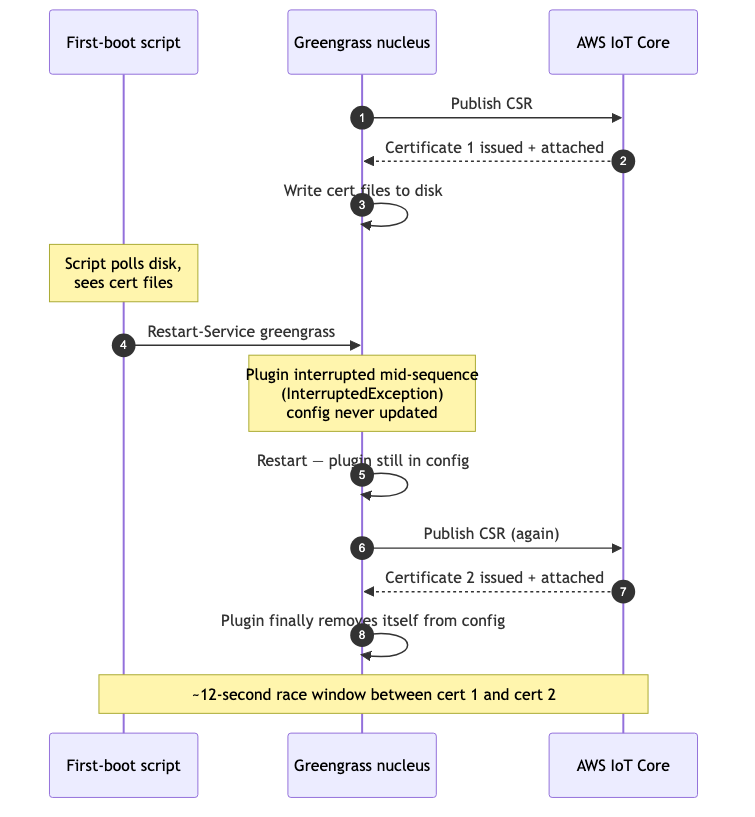 Top to bottom: a first boot script that treats cert file presence as completion ends up triggering a restart inside the provisioning plugin's lifecycle, producing a second certificate for the same thing.
We did not find AWS docs that described the plugin lifecycle as non-atomic, or that warned about restarting Greengrass during provisioning. In our case, the wrong action that hit the window was an early Restart-Service greengrass call from first boot logic that had triggered on cert file presence. Removing the restart fixed the race. In our setup, EFS encryption (cipher /e /a) applied in place while Greengrass held the file open; no restart was needed in the first place.
That removed our need to wait for plugin completion at all. But if your first boot logic does need to restart Greengrass, run a follow-up component, or trigger any action that depends on provisioning being truly done, knowing the right completion signal still matters.
The general rule, valid beyond this specific script: treat Greengrass kernel config as the source of truth for plugin completion. Watch greengrass.log for the plugin's self-removal line. Once that line appears, the plugin is done, and any subsequent restart will not race it.
Identity, certificates, provisioning lifecycle: these are problems you can solve on a clean office network. Satellite uplinks change what "clean" means.
What does satellite bandwidth do to your design?
Greengrass deployments are comfortable when the edge device has fast, steady connectivity. VSAT is a different game.
At this bandwidth and latency, with intermittent dropouts, the failure modes shift. Repeated artifact downloads become real time. Chatty AWS API flows scale worse than the throughput numbers suggest. Partial progress through a deployment is normal, not exceptional. A redeploy that just works in the office can put a large fleet into partial deployment recovery for a working day.
A few design decisions follow:
- Keep component artifacts small and version them immutably. Treat a published version as permanent; never overwrite a version's S3 artifact. Vessels mid-deployment must be able to fetch the same bytes as the rest of the fleet.
- Use a persistent on disk MQTT spooler. AWS provides
aws.greengrass.DiskSpoolerfor exactly this, but only for messages published to AWS IoT Core through the Greengrass MQTT path and within the configured spool capacity. Size it from your actual data rate and the outage duration you need to tolerate. Do not pick a default and hope it is enough. - Throttle rollouts and prefer fewer, larger planned changes. Frequent fleet-wide redeployments multiply VSAT cost and increase the surface for partial failure recovery. A monthly rollup is usually friendlier than weekly hotfixes.
- Design first boot to be retryable. Vessels may lose connectivity mid-bootstrap. The provisioning path should resume cleanly from a partial state. Anything irreversible, such as certificate minting or thing registration, needs careful lifecycle handling.
- Avoid operational paths that require remote desktop. If the deployment can only be diagnosed by logging into the VM over the satellite link, it is not designed for this network.
A practical sizing conversation for DiskSpooler should cover: how many messages per second, average payload size, raw vs aggregate, longest outage you are willing to buffer, what happens when the spool is full, whether dashboards need live data. The same answers shape your tolerance for certificate rotation and other operations that briefly restart components. If the spool protects in flight data, a short maintenance window is acceptable. If it does not, a two-minute window becomes data loss.
The goal is not to make VSAT reliable. The goal is to make the platform boring when VSAT is unreliable.
If the network is unreliable enough that you sometimes cannot reach the device at all, you need a way to verify the fleet that does not depend on reaching the device.
How do you trust a vessel you cannot reach?
Even when you cannot log into the vessel (RDP unavailable, slow, or not authorized; the operator workstation not on Windows; PowerShell Direct ruled out), you can verify a Greengrass fleet entirely from AWS APIs.
The questions you want to answer, and the APIs that answer them:
- Is the core device online and recently seen?
greengrassv2 get-core device. - Did the latest deployment land?
greengrassv2 list-effective-deployments. - Are the expected components installed at the expected versions?
greengrassv2 list-installed-components. - Is telemetry actually arriving? An IoT Core topic subscription, or a CloudWatch metric scraped from message arrival counts.
- Is exactly one active certificate attached to the thing?
iot list-thing-principalsplusiot describe-certificate.
A small verification utility (a Python script with boto3, or a shell wrapper around aws iot and aws greengrassv2) runs those checks for a given thing and prints a one page PASS/FAIL. It works from any operator machine with AWS credentials, on any OS, without device side access. Build it once and use it as the authoritative readiness check.
Wire alarms to the same signals. On VSAT, thresholds should be generous enough to avoid false alerts on every weather event or short outage, but clear enough to distinguish a dark vessel from a delayed one. Hours, not minutes.
If you wire Greengrass logs to CloudWatch, configure batching and a reasonable retention policy. Pushing every log line over the satellite link will eat bandwidth meant for telemetry. Sampling at the edge and uploading aggregated rollups is usually friendlier than streaming raw stdout.
The shift in mindset matters more than any single API. Operational health is something you read from the control plane, not from the device. RDP into a vessel is an emergency tool, not a check.
The intersection is the field
Most individual building blocks in this stack are documented somewhere. This exact combination is not covered by AWS docs as a single path. Each section above is a place where reasonable assumptions from one domain (Linux Greengrass, supported Windows versions, Ethernet connectivity, cloned Windows identities, atomic provisioning) collided with the reality of another.
The useful lesson is not that every Greengrass deployment needs these exact choices. It is that edge architecture is shaped by the physical and operational environment around the runtime. In this case, that meant Windows identity, first boot provisioning, certificate protection, VSAT bandwidth, and remote verification mattered as much as the Greengrass component code itself.
Design for interruption from day one. The vessels will not call you back.
Photo by Francesco Ungaro on Unsplash
Written by



Contact