Blog
AutoGUI - when engineers and stakeholders vibe (code) on the same page

It's just an extra button, they said. It feels almost wrong if we don't get to hear such a classic from stakeholders, who will miss that very extra feature in your dashboard. Their frustration comes next, after not fully grasping the amount of work behind such a simple button, or even if it ends up not adding much to the project.
Vibe coding comes to save the day with quick experiments. Or almost, as stakeholders and domain experts remain left out, because coding tends to stay technical, disconnected from the actual domain context. It is interesting how such a line remains sharply drawn, when vibe coding and requirement gathering rest on the same pillars: abstract input comes in plain language, output goes as implementation or code, and iterations are often needed.
Now toning this drama down to real life, I attempted to materialize a less technical way to bring engineers, domain experts, and stakeholders together, never leaving the dashboard. So I came up with the AutoGUI package for Streamlit which, upon user requests, implements and runs features in real time controlled by an auto-generated user interface. Read ahead and check practical use cases, as well as how to use it, or even contribute.
Use cases
When there is room for flexibility (i.e., experimentation) in the code, AutoGUI can be useful for particular functions in the following (toy) use cases, instead of blindly asking AI to do all the work:
Image Editor
Pipeline of image processing techniques to edit/process some image provided as input:
- Domain expert: asks for image processing techniques for some technical application, or even as a Photoshop user.
- Developer: does prompt engineering, taking into account code-specific aspects; fixes and adapts the generated code if needed.
- Try it yourself
Stock price forecasting
Prediction of stock prices of a given ticker:
- Domain expert: asks for stock-price-related indicators, visualizations, horizon of prediction, etc.
- Developer: does prompt engineering, asks for machine learning techniques; fixes and adjust the generated code if needed.
- Try it yourself
Audio processing
Applying signal processing techniques to raw audio input:
- Domain expert: probes signal processing techniques towards developing a pipeline
- Developer: does prompt engineering, contributes with machine learning techniques; fixes and adapts the generated code if needed.
- Try it yourself
Setup
Installation and requirements
Run the following command to install the streamlit-autogui package:
pip install streamlit-autogui
Important: prior to usage, make sure to have:
- some vendor package installed,
- the respective environment variables needed set (refer to the expected variable names for each vendor), and
- a deployed model identified by a name.
Then AutoGUI will be able to locate and make use of models to generate code.
Usage
AutoGUI works as a placeholder for the (re)implementation of some particular feature. When data coming in and desirable output are known, but the throughput is variable (where experimenting comes in), that is when AutoGUI takes place, as illustrated below, or more practically in use cases.
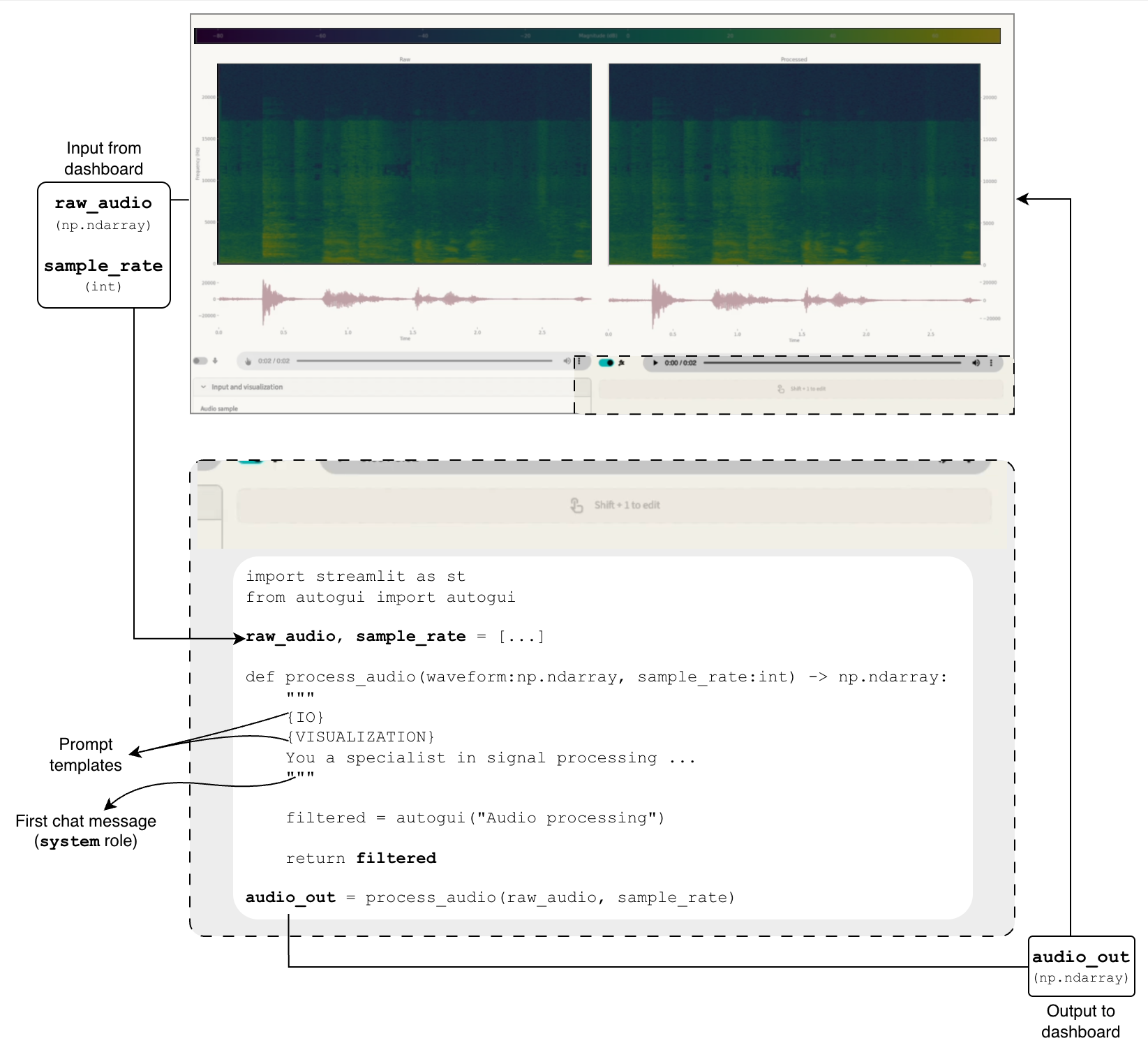
Under the hood, the function docstring is used as the first AI chat message (system role). In order to simplify prompting and avoid repetitive work, some templates for frequently used features are implemented, such as IO and visualization.
Example:
import streamlit as st
import autogui as ag

n = st.number_input("Input number")

# Context: some number n comes from some heuristic process, needs some processing, and then outputs whether the result is odd.

def is_odd(num:int) -> bool:
    """{IO}. Submit number `num` to arith operations. As a final step, return whether the final result is odd."""

    odd = ag.autogui(
        name="Is odd",
        init_prompt="Display input number, raise to a power, add"
    )

    return odd

result = is_odd(n)
if result != None:
    st.write("The result is an","odd" if result else "even", "number")
Refer to documentation for more information, or to the in-app Settings popup to explore more settings. Especially the run upon GUI changes setting, preventing Streamlit from refreshing after every small tweak in UI components.
Limitations and improvements
AutoGUI has limitations. Some to be addressed and improved, others simply inherent to the generative paradigm, which should be taken into account prior to using the package:
- Lifecycle: AutoGUI was built to be used as an exploratory tool, to jumpstart initial ideas that may later become a static piece of code, prompting for human maintenance.
- Code injection: arbitrary code will be executed, both from the AI, and from tweaks made by user. That entails exposure to environment variables, filesystem, and every other resource of the machine hosting the application.
- Generative capabilities: classic garbage in, garbage out situation. A weak model entails weak code. The same goes for quota, impacting follow-up fixes, etc.
- Independent packages: errors are to be be expected when a new package is needed in the generated code. Installing them and rerunning the code should be second nature.
- Autonomy: support to agents and skills would bring more autonomy to AI, as well as better steering of implementations towards domain-specific solutions. Among everything else conveyed in skills, it would also improve UI templating and runtime error correction.
Final remarks
AutoGUI can make vibe coding more human friendly as an attempt to bring coders and domain experts/stakeholders together for experimenting and domain-specific problem solving. It is, however, not a final tool. Once good insights are raised from experimentation, the next step is to make the generated code static, integrated, properly adjusted by the technical team.
The package is in its initial phase, with a lot of room for improvements. I not only invite you to use it, but especially to contribute! Fork the streamlit-autogui repo, bring your ideas, and let's geek!
Written by

Caio Benatti Moretti
Contact