Diese KI-Suchassistenz befindet sich derzeit in einem Pilotprogramm und wird noch weiterentwickelt. Die Antworten, die auf Deutsch generiert werden, können einige Sekunden dauern. Wir streben nach Genauigkeit, aber gelegentlich können Fehler auftreten.
Bitte überprüfen Sie wichtige Informationen, bevor Sie Entscheidungen treffen oder kontaktieren Sie uns direkt.
Antwort
Verwandte Themen
Kontextdateien
Verwandte Themen
Blog
Azure Container Apps und Bicep - Bereitstellung von abhängigen Ressourcen
Esteban Garcia
Aktualisiert Dezember 5, 2025
9 Minuten
Teilen
One of the relatively new technologies Azure offers today is Azure Container Apps (ACA). It first became generally available in May 2022. I believe this service will gain more traction and become very popular for organizations in the future. At a high level, if you’re looking to build microservices or API endpoints or really any background tasks for applications, ACA could be a great fit. The primary benefit it offers is really a serverless container service where you don’t have to worry about any of the complexity with infrastructure or container orchestration like you do with Azure Kubernetes Service (AKS).
It's very easy to provision and standup but also gives you powerful features you can customize. Here are just a few features ACA offers:
Automatische Skalierungsfunktionen basierend auf externem Datenverkehr, CPU- und Speicherauslösern.
Interkommunikation zwischen Container-Apps entweder über Ingress oder Dapr.
Benutzerdefinierte VNET-Integration.
Verteilen Sie den Datenverkehr auf verschiedene Versionen Ihrer App für einfache Blue/Green-Implementierungen und A/B-Tests.
Kostenvorteile, wenn Sie die Möglichkeit haben, auf null Instanzen zu skalieren.
This blog post is not a deep dive on Azure Container Apps. I will provide those details in another post. What we’ll cover here is how to use Bicep to provision a container app with all the related resources you’ll need to get started.
Bicep Übersicht und Azure Ressourcen
First off, if you’re not familiar with Bicep, it’s a declarative language which enables you to deploy Azure resources. I recommend reading this article from Microsoft if you would like to learn more about Bicep before moving forward.
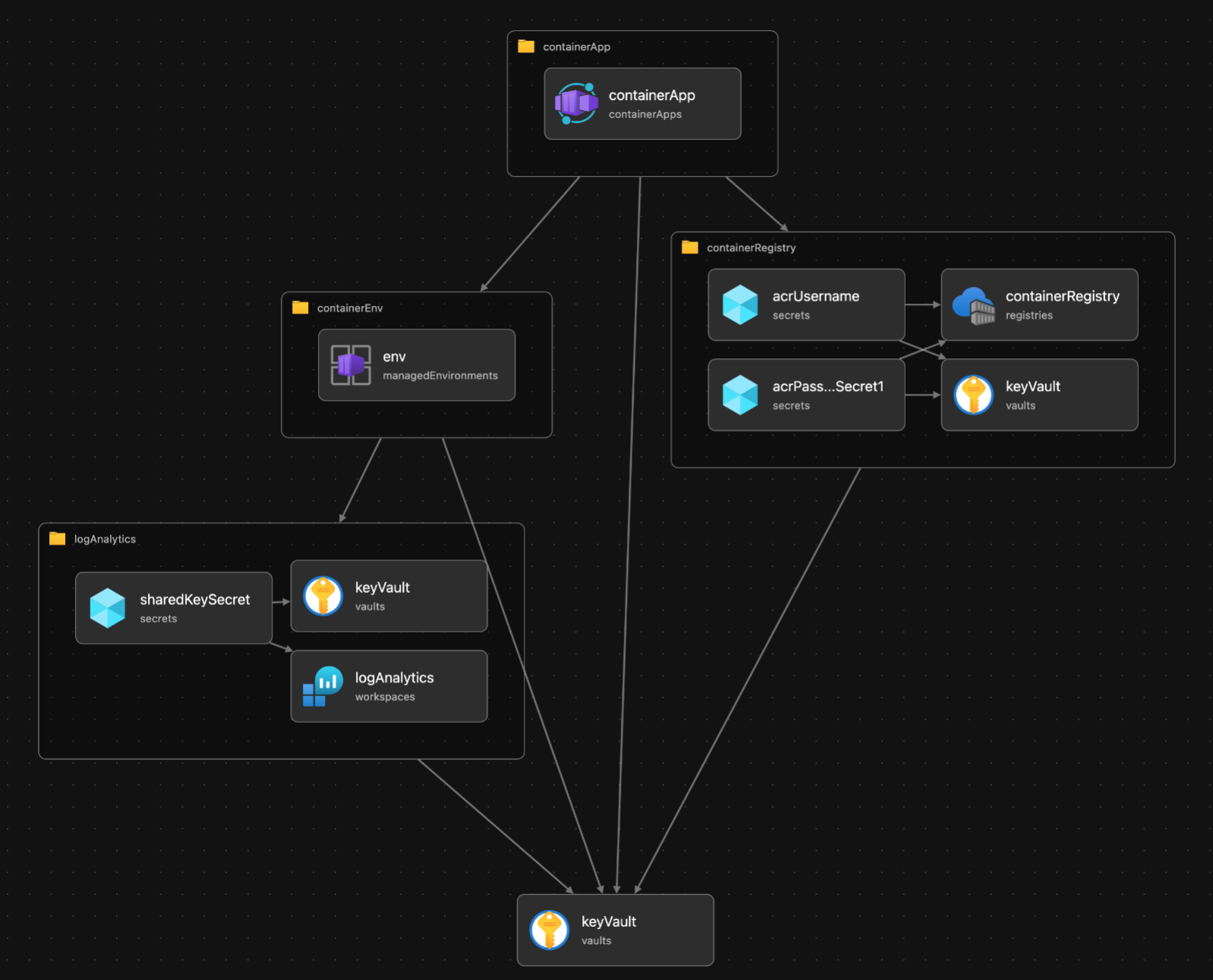
We’ll be deploying the following resources using Bicep which will provide all we need for our initial Azure Container App:
Ressource
Beschreibung
Container Umgebung
Jede Container-Anwendung benötigt eine Container-Umgebung, die eine oder mehrere Container-Anwendungen enthält. Unter der Haube wird die Umgebung in demselben virtuellen Netzwerk bereitgestellt.
Container-Register
Die Container-Registrierung ist der Ort, an dem wir die Container-Images für unsere Anwendung speichern, die dann von der Container-App referenziert werden.
Container App
Die Ressource der Container-App selbst.
Logbuch-Analytik
Wir verwenden Log Analytics für die Protokollierung verschiedener Daten aus der Container-Umgebung wie Telemetrie- und Leistungsprotokolle.
Schlüssel Tresor
Im Schlüsseltresor werden die Geheimnisse gespeichert, die unsere App für den Zugriff auf die Protokollanalyse und die Anmeldeinformationen zum Abrufen von Images aus der Container-Registry benötigt.
The dependent resources are illustrated in the following diagram:
Bizeps Dateien
I’ve structured the resources into five files. One file for each resource which are Bicep modules and a main file. Main.bicep will call into the other modules to run the deployment:
Note: A module is used to organize and break down the bicep code into smaller components. It helps with readability and organization so you don't have to have all your deployment details in one file. It's also useful to reuse certain modules with other deployments as well.
Main.bicep (contains the Key Vault resource)
containerApp.bicep
containerEnvironment.bicep
containerRegistry.bicep
logAnalytics.bicep
Note: When deploying bicep resources, the Azure Resource Manager will evaluate dependencies and will deploy them in the correct order. When there are no dependencies, they will be deployed in parallel. I'll address how we deploy the container app using a new container registry (with no images) later in the post.
Geheimnisse der Handhabung im Bizeps
Before we look at the bicep for each module, one of the important points to understand is how secrets are handled. There are resources which will be dependent on one another. For example, when we configure the container app environment, we’ll need to specify the log analytics shared key which the container app requires for the app logging. To solve this, we’ll be using key vault to house the secrets which can be used across our bicep files.
In addition to using Key Vault there are also other options which can be used to handle secrets:
Use Managed Identities if you don’t want to worry about handling or dealing with secrets/credentials in your bicep files. It allows for authentication and authorization across other resources in Azure.
Avoid secrets in your bicep files and pass in the value of the secrets from a CI/CD pipeline. An example of this would be storing credentials for the container registry in a GitHub actions secret.
I prefer keeping all my secrets in Key Vault so they are securely managed in a central resource. You can also store other keys, certificates or passwords which future resources can use.
The following example is how you would deploy an Azure SQL database and provide the bicep file the username and password as parameters in a GitHub Actions workflow:
Other things to keep in mind:
Use the @secure() decorator for all sensitive parameters. This will ensure the underlying Azure Resource Manager won’t log any passwords or sensitive variables. An example of this can be seen in the container registry bicep file below on line 6.
Do not output secrets in your bicep files. I've often seen outputs which will include a username or password so it can be used by another module. The values could be compromised by anyone who has access to the deployment. To avoid this, you can add your secrets to Key Vault or use managed identities. An example of this would be:
I've included abbreviated versions of the bicep files below. For the complete solution you can reference the files in the following GitHub repo: GitHub - jarrodgodfrey/containerapp-bicep
Here you can see the log analytics resource defined on line 7. What’s more interesting is I’ve defined another resource referencing the existing Key Vault in main.bicep on line 3. I’m using it to set the parent when we add the log analytics shared key to the vault on line 25.
Similar to what was done in logAnalytics.bicep, the username and password are being added to key vault starting on line 23. This is important because the container app itself will utilize those secrets from Key Vault to pull the images from the registry.
Notice we’re passing in the container registry credentials and using them on line 32 so the container app will have access to pull the images. Another important line is 41 where the image is specified. We’re providing the container app the server name of the registry and the name of the image.
You can see here where the Key Vault resource is defined and how all the modules are being invoked and deployed.
Note: Since we are deploying a new container registry there will be no images when it’s first deployed. I’ve included a conditional parameter which will bypass the deployment of the container app for this reason. In other words, if you try to deploy a container app which is referencing an image that doesn’t exist it will fail.
To navigate through this issue, you can set the ‘isContainerImagePresent’ parameter to false when executing main.bicep for the first time. Once the first image is deployed either manually using docker or running a GitHub Actions workflow, you can run main.bicep a second time and set ‘isContainerImagePresent’ to true.
Please review this article to understand how to push an image to the container registry.
To execute the deployment via the Azure CLI run (the 't' parameter will work and will be interpreted as 'true'):
az deployment group create --resource-group rg-epic-app --template-file main.bicep --parameters isContainerImagePresent=t
Fazit
I’m extremely excited about the future of Azure Container Apps. As I’ve said I think this technology will really take off once it’s fully adopted by the community. This post has targeted the approach to deploy all the resources you need to get started with a container app. I’ve also explained how to configure the Bicep files so each resource can read and store secrets in a secure way where applicable.
I’ll plan to write another post which will be more of a deeper dive into the capabilities of Azure Container Apps… stay tuned!
Learn more about how Xpirit can help you transform your business !
Managing Director at Xebia Microsoft Services US and a recognized expert in DevOps, GitHub Advanced Security, and GitHub Copilot. As a Microsoft Regional Director (RD) and Most Valuable Professional (MVP), he leads his team in adopting cutting-edge Microsoft technologies to enhance client services across various industries. Esteemed for his contributions to the tech community, Esteban is a prominent speaker and advocate for innovative software development and security solutions.